• Zum Inhalt springen
  • Zur Seitenspalte springen

Technik News

Das Blog zu IT, Mobilfunk & Internet

Archiv für 2007

Apple is against Bluetooth, but why?

September 14, 2007 von Harald Puhl

First day with my shiny new iPhone, unlocked to work on Vodafone’s network – so far so good, pretty much loving it. Until I looked at the Bluetooth specs. Basically, this thing is only useful for mono headsets and carkits, and that’s it.

The iPhone has been certified under Bluetooth 2.0 + EDR, as can be seen in the BQB documents, but the PICS detail only handset and audio gateway profiles, with required signaling profiles such as RFCOMM, pretty much the bare minimum for a working Bluetooth hands-free system. What about the ton of other profiles, for example, A2DP, FTP, DUN…? Not included. The iPhone uses a CSR BlueCore4 Audioflash, which has 6MB of onboard FLASH memory, and could be upgraded provided that there is a host controller with access to the SPI port on the BC4. It seems that the iPhone uses Open Interface’s BLUEmagic 3.0 stack [PDF], which would imply an external host controller.

Now I’m starting to get confused – you usually choose a FLASH BlueCore if you intend to run software on it, be it CSR’s own stack, or a customized version of it. If you intend to use a host-based system, where the stack is handled by an external processor, you can buy way cheaper BlueCore ROM chips – and we’re talking between $1 and $3 a piece in savings. This may not seem much, but when multiplied it by Apple’s sales, you have a hefty sum. Below is a graphic that illustrates the differences between a host-based HCI system (left) and a standalone or ROM implementation (right):
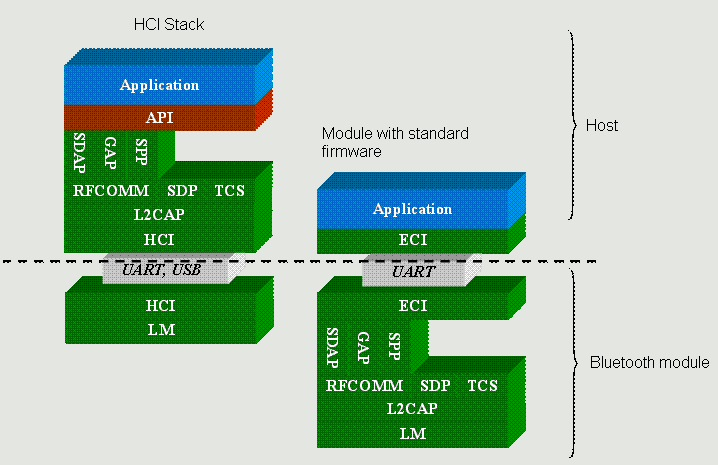
bt_profile_diagram_hci

The big question still is – why is Apple so Bluetooth-unfriendly? Did they have certification problems and rushed through the bare minimum specs to claim Bluetooth compatibility? This seems strange as the iPhone was certified by CETECOM, which probably is the most experienced lab on Bluetooth certification in the world. Same applies to MacBooks and Mac Pros, they feature a few more profiles like FTP, but not A2DP. Hoping for a firmware update to fix this mess, over and out.
Skype phising attacks, beware of links from your contacts

September 10, 2007 von Harald Puhl

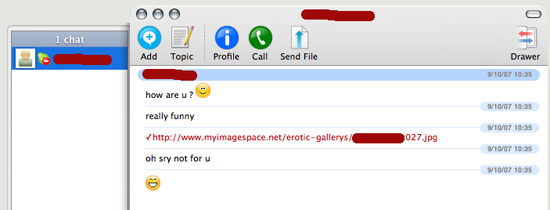
Last Saturday, while reading through my feeds, I noticed this post on TechCrunch by Duncan Riley, where he tells the story of an attempt by scammers to get his Skype credentials (and wonders why they’d want to do such a thing), much in the same way we’re accustomed to receive emails from PayPal, eBay, and almost any bank on earth. These emails claim there is a problem with your account, and you should ‘confirm your details’ in order to stop said account from being suspended. This will of course do nothing other than give your credentials to these criminals for unhealthy purposes.

Today, a friend that I had not chatted with in some time comes online, and sends me this:skype_scam


My first thought has been “Uhm, why would Mike send me something like this?”. He’s not prone to even send smilies, always very short and to the point. I go to ask him about it, but I then notice he is in do-not-disturb mode, so I cannot even warn him about the now-obvious scam! It seems that phishers and other scum are realizing people fall for email traps less and less, and are attacking other more trustworthy systems. In this case, the attacker is sending a screensaver, most likely loaded with a trojan. Beware of -any- communication, even from friends, that is unusual in timing, behavior or content. Also, beware about being asked for your IM details, and use strong passwords.

Free WiFi at Fresh&Ready restaurants in Barcelona

September 6, 2007 von Harald Puhl

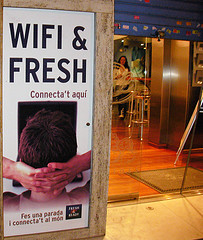
Shame they’re a bunch of morons – they told me taking pictures of their restaurant from the street was illegal (!?). If someone came and took a picture of an ad I plastered on my wall…I’d be more happy than anything, it would mean people notice it (even if it was a competitor). Anyway, if you come to Barcelona, check out Fresh&Ready, not for the food, but for the free WiFi.

Free WiFi in Barcelona


Memories from the Kinder Mountain Rescue Team

August 24, 2007 von Harald Puhl

Browsing through some old photo albums, I came across a set of photos from my years with the Kinder Mountain Rescue Team, based in Hayfield, UK. After going through high school in Southend, near London, I moved to Whaley Bridge, a small town south of Manchester, to pursue my degree in Aeronautical Engineering at the University of Salford. One day, while walking towards the popular Kinder reservoir area for a weekend walk, I noticed a small hut belonging to the KMRT, and basically crashed into one of their meetings. After talking to some people from the exec team, I was accepted as a probie, not without a strange look on some faces (”what’s this guy from Spain who we’ve never seen before doing here?” sort of look). Normal probie period is six months, but, normally probies are introduced by team members, who know them and their capabilities and can make the recommendation. I was coming out of the blue, so I spent about a year as a probie, before being admitted as a full member.

Why, would you ask? Well, a couple of years earlier, I broke an ankle while descending a winter route in the French Pyrenees, and was brought to safety by a mountain rescue team. Ever since, I felt there was something I had to pay back – and this was the chance. During my stay with the KMRT, we performed all sorts of operations, from rescues of people with broken limbs, to searches for lost walkers. We trained a lot, and participated in huge exercises involving many local teams, Police, RAF helicopters and aircraft, K-9 units, and the ambulance service. One of the exercises I keep pictures of is a paper helicopter crash on Kinder plateau (we used the word ‘paper’ to describe anything fictional in the contest of an exercise, for example, “call the paper RAF and request a paper helicopter and a paper ambulance”, just in case anyone listening on the radio thought it was the real thing)

A very realistic victim, with a very realistic amputated limb. The excellent members of the Casualties Union provide the most believable victims you can find, with makeup, real bone fragments (from sheep of course!), and other surprises. Everything you’d need to film a good zombie movie.

Finally, this picture was taken during a winter route in Scotland, the most remarkable fact being that we had perfect weather – which is something to put in your memoirs. As we descended, a single, tiny, white and fluffy cloud passed by, as if saying “yeah, you’re not going to get away -that- easily!”. For the record, Andy was just making fun with the ice pick, he didn’t actually hit anyone!

Airport firefighting

August 23, 2007 von Harald Puhl

They are usually forgotten, as they tend to see a lot less action than non-airport bound firefighters, but boy, do they have cool equipment to play with! Airport fire departments have some very tight performance parameters, basically, because when a huge piece of aluminium, titanium, passengers and fuel crashes and ignites on or near a runway, every second counts. That’s the reason this 40-ton baby accelerates from 0 to 80 Km/h (50mph) in around 25 seconds. In proportion to weight, this is faster than a 1997 McLaren F1, which hits 100 Km/h (60mph) in 3.3 seconds!
The Rosenbauer Panther 8×8 MA5 airport and rescue firefighting vehicle. Sporting a 1000 hp engine (yes, that is not a typo), it carries 12.5 tons of water, 1.5 tons of foam liquid, and up to 1 ton of NP powder. Full specs here. Up to three monitors (two mounted at the front, one top) give it a range from 25 meters up to 85 meters, all controlled from the cabin with joysticks and cameras. At 11 bars of pressure, the top monitor can empty the water tank in two minutes. The cabin controls look like something out of Star Wars.
Note the complex MFD control system for the hydraulics – so much for turning a wheel and having water come out a hose, right? While I did part-time work at Southend Airport, I was able to ride and operate a much smaller, much simpler, but equally fun Carmichael truck. Will post a pic when I find it and scan it (film rolls back then, the only thing digital in cameras was your finger).

Some image application programs that can do image modification and/or format conversion

August 20, 2007 von Franz Hieber

MS Paint, Visua, Irfan View, Adobe Photo Deluxe and Paint Shop Pro will be mentioned here. This group has been cited because they are often found among the software available to users.
MS Paint is installed with Windows. It can be used for cropping and re-sizing, among others.
Irfan View is a free download. Irfan View is full-featured viewer/modifier/converter.
Visua can be obtained from private archives and is mainly an easy-to-operate viewer and format converter, which can be used to crop and re-size.
Adobe Photo Deluxe is often bundled with purchased peripherals like printer, scanner, or camera. It is a full-featured viewer/modifier/converter. More complete image application programs like Adobe PhotoShop LE have occasionally been sent as free software with the purchase of a peripheral.
JASCs Paint Shop Pro has many uses, and is suitable for colorizing and some types of retouching. It also is an image format converter, with the standard supported file types. It has a collection of tools that allow a user to make many types of midifications to an image. In the Colors|Adjust tool, there are six menu choices that provide dialog screens for making modifications. Among them are a gamma tool adjustment where the gamma values selected for red, green, and blue may be selected independently or together.

Altering the image content (in addition to the modifying steps shown above) can include:
Smoothing edges, reducing granularity, reducing moir patterns, adding special effects, balancing brightness from one region of the image to another, retouching, rotating the image by multiples of 90 degrees, rotating the image by a selected amount, and flipping an image horzontally or vertically.
Printing features may include:
Print preview, an image scaling and positioning feature, rotating the image by 90 degrees, presence or absence of header, footer, pre-set margins, etc.
Viewing features may include:
Manual or automatic stepping through a collection of files, viewing a cluster of files as thumbnails, reproducing sound files along with images.
Applications to add displayability to images include:
Adding captions and/or legends, adding automatic presentation features to an image collection.
Displaying animated images:
Animated GIFs are a stepped sequence of GIF images which simulate motion. Animated GIFs wont work in all viewing software. They are commonly used on web pages, as they will display properly in web browsing viewers.

A brief discussion on images which are produced in scanner formats or in image converter formats.
When working with images in scanner software or in image converter software, it is useful to remember that these are temporary image files with formats which:
Can modify the appearance of the image file that was imported. Can be used to make a print of the modified image. Usually wont be useful in this current format to share but will allow you to see what you have Must be saved or exported to a folder elsewhere on a drive which has a folder assigned to accept it, if you wish to share it or archive it. Dont alter the source image that is, not unless you save or export the file and assign the same file name and place it in the folder from which it came.
Although such scanned temporary files may be retained by some scanner software, they will only serve as your own archived images for later retrieval, and then generally for short retention periods.

  • « Vorherige Seite aufrufen
  • Seite 1
  • Seite 2
  • Seite 3
  • Seite 4
  • Seite 5
  • Weggelassene Zwischenseiten …
  • Seite 8
  • Nächste Seite aufrufen »

Seitenspalte

Tags

3D-Drucker Amazon AOL Apple asus memo pad Blackberry Dell DSL E-Book E-Book-Reader Ebay Elster Facebook Google Google Android Handy Hardware Hotmail IBM Internet Makerbot Microsoft mobiles Internet Netbook Prism Quantencomputer Rundfunkbeitrag Samsung samsung galaxy fame Samsung Galaxy Mega Samsung Galaxy Tab SchülerVZ Skype Smartphone Software sony xperia tablet z Suchmaschine Tablet Tintenpatronen Twitter Typo3 WebOS WhatsApp Xing Yahoo

Technik News Kategorien

Ausgewählte Artikel

LTE tilgt weiße Flecken und drückt aufs Tempo

LTE steht für Long Term Evolution und zugleich für den Vorstoß des mobilen Internets in die erste Liga der Breitband-Internetverbindungen. [...]. Heutige Angebote für mobiles Internet bringen 3,6 oder gar 7,2 MB/sec. Der Zugang erfolgt dabei meistens über einen Internet Stick der dank USB-Schnittstelle sowohl an einem Laptop wie auch am Desktop-Computer verwendet werden kann.


Externe Festplatte mit 3,5 Zoll, 2,5 Zoll oder 1,8 Zoll

Angeschlossen wird die externe Festplatte über USB, Firewire, eSATA oder einen Netzwerk-Anschluss. Vorsicht: Bei manch einer externen Festplatte stört ein lärmender Lüfter. Die kleineren Notebook-Festplatten sind 2,5-Zoll groß. Eine externe Festplatte mit 2,5-Zoll nimmt in den meisten Fällen über den USB-Anschluss Kontakt zum Computer auf und wird über dasselbe Kabel auch gleich mit Strom versorgt.

Inhaltsverzeichnis | Impressum und Datenschutzerklärung