• Zum Inhalt springen
  • Zur Seitenspalte springen

Technik News

Das Blog zu IT, Mobilfunk & Internet

Archiv für 2007

Jawbone – the best Bluetooth headset ever

August 9, 2007 von Franz Hieber

Just today UPS dropped off (well, I intercepted the driver in mid-flight, but that’s a different story) the Jawbone Bluetooth headset I was waiting for – and boy, does it work wonders! This has to be the best implemented piece of DSP technology I have seen. If you don’t believe in ‘official’ demos and blurb from jawbone.com (they are true), just check out this audio recording [WAV, 48kHz, 1.7MB]. The first part is recorder using my Mac with an unsquelched radio about 30cm from the headset, with the DSP turned off. I then turn it on, and the audio is recorded perfectly, with barely a hint of the background noise.
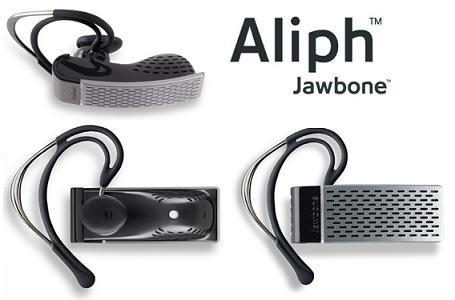
jawbone

How do they do it? I’ve not opened this baby up, as it’s too good-looking (and expensive), but it seems that they combine two directional microphones with a vibration sensor (the small white dot you see on the picture) that picks up bone-transmitted voice from your jaw (thus the name). By matching the vibrations, which are not enough to actually record sound, with the incoming audio from the microphones, they can take away the extra noise very effectively. I should know, as in my previous job, one of our biggest problems was noise and echo cancellation (I was responsible for electronics R&D at SouthWing, designing and testing Bluetooth headsets and other accesories) – and we could never completely kill feedback echo, and noise – forget it. Our designs were in the top league as far as audio quality and noise went, but try what I just did today and the whole recording would have been like the first half.

Good job, Aliph!
You know your company really sucks when…

August 8, 2007 von Harald Puhl

…you need to pre-emptively register the domain [yourcompanyname]sucks.com – since 1997. This is the case of none other than UPS.

Take a look at the upssucks.com WHOIS information:

United Parcel Service
340 MacArthur Blvd

Mahwah NJ
07430
US

Domain name: upssucks.com

Created on: 1997-12-31
Expires on: 2007-12-30

Maybe it is time to get creative – today I got mighty pissed off at them, because the driver who was supposed to deliver my Jawbone headset today, was “confused” by an address like this:

Street Name 16 my@emailaddress.com

Apparently, the fact that the contact email got wrongly appended to the street address caused major confusion in the brain cells of this driver, who should of course apply for Mensa right now. The rest of the address was just fine, the only thing ‘weird’ was the email address mixed in. Of course, they cannot turn him around, and I have to wait until tomorrow…

What good is UPS international shipping for?

August 7, 2007 von Harald Puhl

I ordered a Jawbone Bluetooth headset on the August 1st. By about the 9th, I should be getting it in my hands. This would not be too bad, were it not that UPS Worldwide Expedited was paid for, at almost $50! Aliph’s site quotes 3-4 business days, but this will be more like 6-7. From now on, I think I’ll request USPS Air, as it costs a fraction, it usually arrives quicker, and has never been held up in customs (I can tell UPS horror stories of packages held for days while some stupid customs inspector felt like having a look at the paperwork…).

TUAW: Kismac is far from dead – they are just moving

Juli 30, 2007 von Harald Puhl

I read with shock and horror this post on The Unofficial Apple Weblog about a post by Michael Rossberg, one of the developers of Kismac, that states:

There has not been a lot of time for KisMAC lately. However the motivation for this drastic step lies somewhere different. German laws change and are being adapted for “better” protection against something politicians obviously do not understand. It will become illegal to develop, use or even posses KisMAC in this banana republic (backgound: the change of § 202c StGB).
While I cannot do much about that for now, you probably can. Make copies of KisMAC and its source as long as the website is up! Do further development outside of Germany, even better outside the US and EU! If you are a German resident, you will need to fight for your rights.

The post has also been slashdotted, and drawn 155 comments last time I looked. Kismac is a very popular WiFi sniffer for Mac OS, also boasting key cracking functionality that is not present in other sniffers such as iStumbler.

My first reaction was to contact Geoff, one of the lead Kismac developers, who reassured me that Kismac is far from discontinued or deceased, they are basically relocating their servers (the SVN is already abroad) to a country that is not falling into draconian terms which remind us of unfortunate recent history. Since June 2007, new German law makes it illegal to pretty much do any form of investigation or development in the IT security field, as simply releasing a password cracking tool could land you in jail, and possibly even cause anti-terrorist provisions to be applied to you (anally, one would guess). Some comments from the Phenoelit crew also point in this direction – there is a disbandment towards other countries, and a tacit acknowledgment on the original sites that this is to comply with the new laws.

In Kismac’s particular case, Mick seems to have put the point across in pretty blunt terms, not stating that they are in fact relocating somewhere else, making it seem that the project was dying. I actually believe we will see some pretty neat developments in Kismac real soon…but that’s just a calculated hunch

Apple to offer all-you-can-eat subscriptions to iTunes?

Juli 2, 2007 von Harald Puhl

Looking at how Universal Music Group has decided not to renew their contract with the iTunes music store (which is by the way the third largest music retailer in the U.S., not just online, but globally!), I predict two things will happen:

  1. Apple will offer a subscription-based model, where you pay a weekly or monthly fee, and can download as much as you want from their catalog. Right now, iTunes imposes the price they buy their music at, and it has been patently obvious that many labels were not at all happy with the $0.99 a song pricing scheme.
  2. UMG will see their music pirated like no other label. If people cannot even get their music from a convenient and easy to use source, for a one-could-argue reasonable price, they will find ways to get it from other sources. There are alternatives to piracy, such as MP3Search.ru, which provide songs at $0.19 a piece, DRM-free, and they have a very extensive repertoire (albeit sometimes not as complete as iTunes’).

Will this prediction come true? It depends on how much it would hurt iTunes to lose Universal, and I think it would hurt a lot.

Building a USB programmer for Motorola radios

Juni 25, 2007 von Harald Puhl

Part of my duties at my local Fire Department where I am a volunteer is to take care of the radio communications, be it maintaining the repeaters and base stations, to installing new gear and training probies in the art of radio. Recently, I was given a couple of Motorola Radius GM300 mobile radios, a GM350 and a set of three GP320 one-channel handhelds. I have worked with Motorola equipment plenty of times, and have over the years purchased RIB and cable kits, and RSS and CPS software to match. But, the gremlins had managed to lose my RIB box and cable kits, leaving me unable to do anything useful with the radios I was given.

The $30 USB universal programming cable

A tinkerer as I am, the first thing that came to mind after thinking about the various options I faced (purchase a new set of RIB boxes, cables, etc. was an expensive proposition) was to tweak a readily-available USB to serial port converter into a pseudo-RIB, and then making patch cables with the electrical and data bus configuration each radio model required. These converters all share some common traits – they sport an FTDI USB to serial converter, and a Sipex SP213 or similar TTL to RS232 level voltage converter. It should be easy to remove the Sipex chip, and bridge the FTDI directly to the DB9 connector, thus creating a direct USB to TTL serial port adapter. Ready? Let’s get started!

Part I – Open-heart surgery on the USB adapter

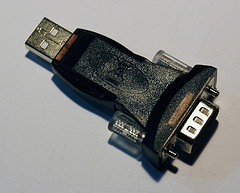
The looks of the USB adapter prior to the procedure are shown in this picture:

2_1

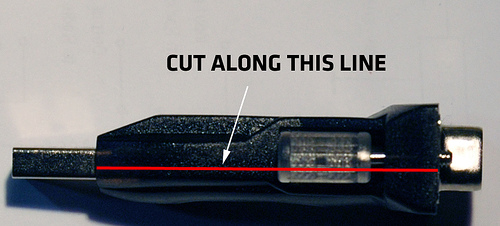
The first step is to cut open the overmolded plastic, so that we can work on the circuit unimpeded. The adapter used here is available in many local shops where I live, but any similar converter will do the job. With great care to not cut too deep (you risk damaging the components on the circuit board!), use a Dremel or sharp pen knife to make an incision along the red line:

Cut here!

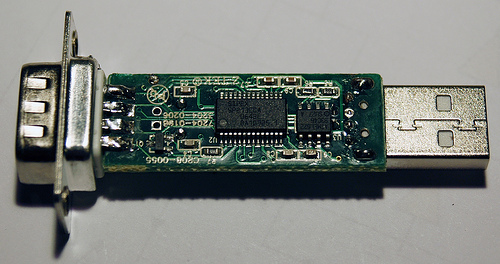
Repeat on the other side of the adapter. On some of these devices, the plastic is not fully opaque, allowing you to see where the circuit board’s edge sits. Once you finish the cuts, carefully pry the two plastic halves apart, until you have something that looks like this (the SP213 is the large chip):

PCB before

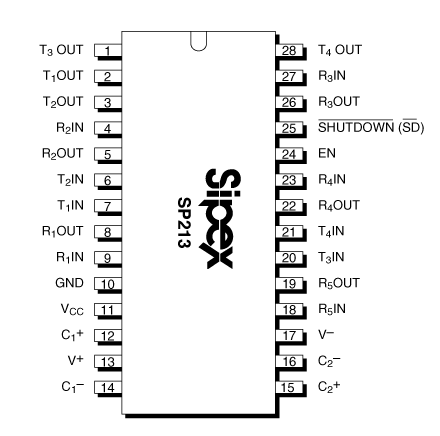
The TX and RX pins of the FTDI chip are connected to TxIN and RxOUT pins on the SP213 respectively. The TTL signal going into pin TxIN is then converted to a +10/-10 volt signal out of pin TxOUT. Similarly, the data signal coming from the serial port into pin RxIN at +10/-10 volts is converted to TTL (0/+5 volts) out of pin RxOUT. In this particular converter, the pins used are R4IN/R4OUT, and T1IN/T1OUT. As can be seen in the chip layout, the inputs to the FTDI are next to each other, so a simple solder ball will bridge them, and T1IN/T1OUT will have to be bridged using a wire.

Sipex SP213

Removing the SP213 can be done in various ways – if you have a hot air gun, you can clamp it with tweezers and hold the board up a few millimeters while you slowly heat it, until the board falls down from under the chip. You can also use a regular fine-tipped soldering iron and place a big solder blob along one of the rows of pins, then lift up gently, repeat on the other side. Clean excess solder with some copper wick.

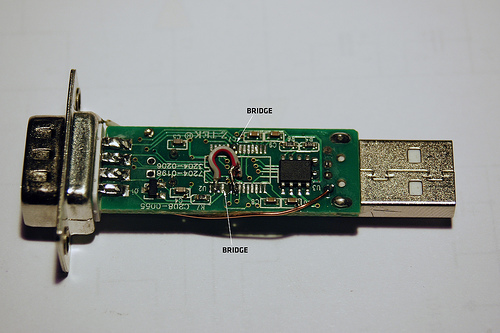
The end result, after removing the chip and placing the bridges is as shown (forgive the ugly gray wire – it’s better to do it with insulated copper wire, but I didn’t have any left at the time).

PCB after modification (bottom)One final step required for some radios is to feed a steady 5 volts out of the DB9 connector. This can be solved by cutting the trace leading to pin 1 of the DB9 (which is not used for anything useful), and running a wire from the +5V pin of the USB connector (this is also shown on the above picture).
Finishing touches

If unlike me, you are good at handywork, you should be able to put the modified board back inside the plastic mold, and glue the cut shut. Otherwise, a heatshrink tube cover works just as well.

Part II – Radio-specific programming leads

Since I had an immediate problem to solve, the easy course of action was to build the cables required to program the GM300s and GP320s. With some luck, the GM300 cable should also program the GM350.

GM300 cable

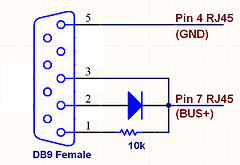
Working off this schematic found on the very excellent BatLabs site (thanks for getting me out of many fixes, guys!), the following schematic was drawn:

GM300 cable schematics

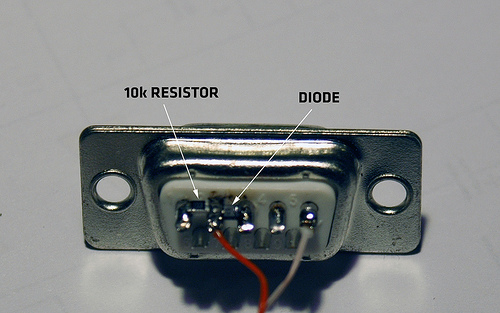
which resulted in this connector:

GM300 DB9The diode and resistor used are 0603 SMD, as they fit very nicely between the pins of the DB9.
GP320 cable

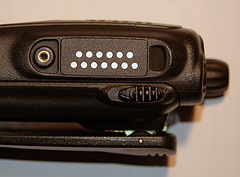
This one was going to be more involved – contrary to the GM300, the GP3×0 series of radios doesn’t have an RJ45 connector, which is pretty standard and easy to crimp. Instead, it has a 13-way (what a lucky number to pick!) contact pad connector, which doubles for accessories and programming.

GP320 side view

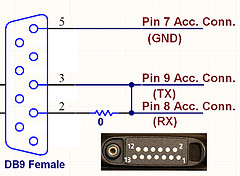
On a service manual, I found the pinout of this connector, and identified the ground, TX and RX pads – which as usual, appeared tied into a single bus for sending and receiving data. I assumed from some other schematics found on BatLabs that the same requirements would apply for this cable, i.e. a pullup to +5V on the data line, isolation via diode of TX and RX…but nothing worked. Eventually, I tried the simplest approach: bridge the TX and RX pins of the DB9 with a 0-ohm resistor. And it worked. This is the stupidly simple schematic of the GP320 cable:

GP3x0 cable schematic

I managed to concoct a three-prong stiff connector, which had to be held by hand against the three pads on the side of the radio, while driving the mouse with the other hand – not comfortable, and potentially dangerous (enough for testing it worked though!).

Part III – GP320 cable – reloaded!

Not happy with having to hold the DIY connector against the radio, an idea popped into my head – these radios come with a plastic cover that screws into place, guarding the connector against water and dirt:

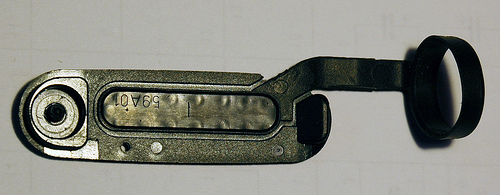
Cover with rubber partIt appeared that the cover was made out of two pieces, a hard plastic lid with a molded-in rubber part, which covered part of the hard lid and formed the collar that clamps the whole thing to the antenna. If this rubber piece could be removed, and the plastic used to mount three spring-loaded contacts…we’d be in business!
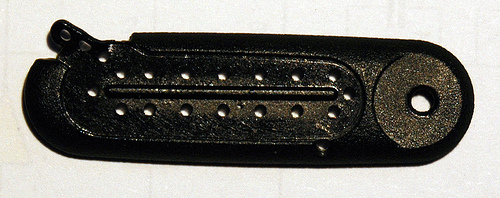
Mill-max – the hacker’s friend

Mill-max is a manufacturer of all sorts of electrical contacts, one of their product lines being spring-loaded board-to-board pins. I had used the shortest pin on their catalog for another project, and had a few samples left. These pins can be ordered through DigiKey in small quantities, and they usually keep stock (part number 0900-0-00-00-00-00-11-0). The pins I had were very similar to the ones used in genuine speaker/mics and programming cables:

MillMax pin

Inserting the pins

After removing the rubber part, the hard plastic cover looked like this:

Cover with no rubberIt was a matter of finding the location of the pads below, and drilling the pins in. Two factors caused this to turn out better than I thought – I didn’t have a 1.8mm drill (only 1.5mm), which is the pin’s barrel diameter, and even so, what would hold down the pins? The solution: drill 1.5mm pilot holes, and then drive the pins into them, melting the plastic by applying heat from soldering iron on the back of the pin. Done with care, the end result is this:
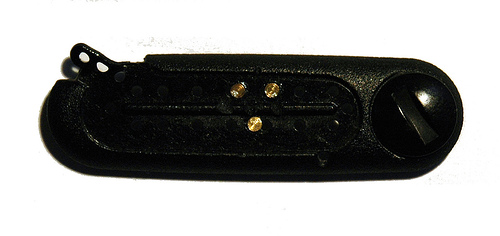
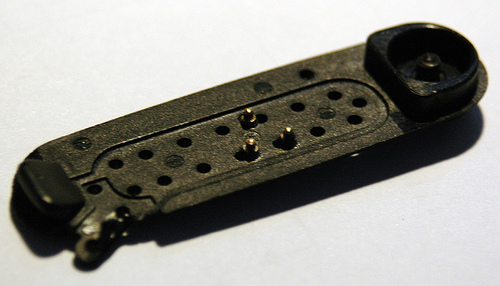
Pins inserted into coverPins inserted into cover (bottom view)

Cabling up

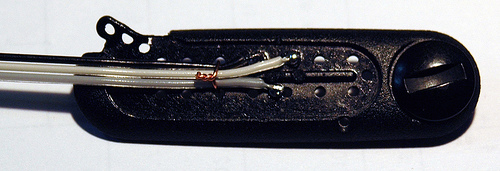
Once the pins had settled, and were checked for correct spring action (the molten plastic could have gotten into the barrel, locking the spring into place), a three-way flat cable was soldered to the back of the pins, and held down against the cover with a thin insulated copper wire:

Cable tied downGluing down

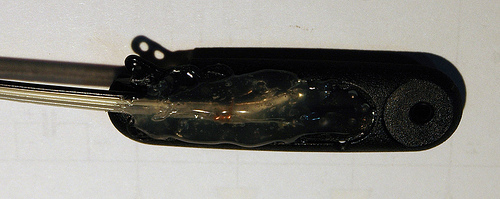
A quick shot of hot glue was applied to the top of the connector, which flowed a bit into the remaining open holes, fixing the whole assembly in place. This is what the connector looks like:

GP320 connector gluedAnd that’s all there is to it! I now have a very light, multi-use, USB programming interface for all kinds of radios – just by changing the connector layout on the female DB9, other radios such as Vertex and Icom could be programmed with ease.

Comments, suggestions and improvements welcome!

  • « Vorherige Seite aufrufen
  • Seite 1
  • Seite 2
  • Seite 3
  • Seite 4
  • Seite 5
  • Seite 6
  • Weggelassene Zwischenseiten …
  • Seite 8
  • Nächste Seite aufrufen »

Seitenspalte

Tags

3D-Drucker Amazon AOL Apple asus memo pad Blackberry Dell DSL E-Book E-Book-Reader Ebay Elster Facebook Google Google Android Handy Hardware Hotmail IBM Internet Makerbot Microsoft mobiles Internet Netbook Prism Quantencomputer Rundfunkbeitrag Samsung samsung galaxy fame Samsung Galaxy Mega Samsung Galaxy Tab SchülerVZ Skype Smartphone Software sony xperia tablet z Suchmaschine Tablet Tintenpatronen Twitter Typo3 WebOS WhatsApp Xing Yahoo

Technik News Kategorien

Ausgewählte Artikel

LTE tilgt weiße Flecken und drückt aufs Tempo

LTE steht für Long Term Evolution und zugleich für den Vorstoß des mobilen Internets in die erste Liga der Breitband-Internetverbindungen. [...]. Heutige Angebote für mobiles Internet bringen 3,6 oder gar 7,2 MB/sec. Der Zugang erfolgt dabei meistens über einen Internet Stick der dank USB-Schnittstelle sowohl an einem Laptop wie auch am Desktop-Computer verwendet werden kann.


Externe Festplatte mit 3,5 Zoll, 2,5 Zoll oder 1,8 Zoll

Angeschlossen wird die externe Festplatte über USB, Firewire, eSATA oder einen Netzwerk-Anschluss. Vorsicht: Bei manch einer externen Festplatte stört ein lärmender Lüfter. Die kleineren Notebook-Festplatten sind 2,5-Zoll groß. Eine externe Festplatte mit 2,5-Zoll nimmt in den meisten Fällen über den USB-Anschluss Kontakt zum Computer auf und wird über dasselbe Kabel auch gleich mit Strom versorgt.

Inhaltsverzeichnis | Impressum und Datenschutzerklärung