• Zum Inhalt springen
  • Zur Seitenspalte springen

Technik News

Das Blog zu IT, Mobilfunk & Internet

Archiv für August 2006

My Boeing 767 runs Linux, and yours?

August 20, 2006 von Harald Puhl

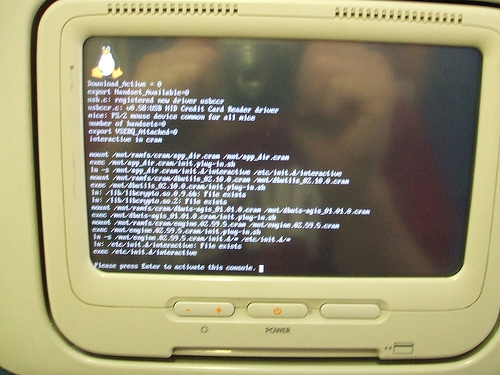
This was seen on a Boeing 767 while en route from Las Vegas to Atlanta, the flight being operated by Delta. Apparently, many people were having problems with their purchased movies, and so the crew decided to reset the system, provoking a nicely familiar sight.
215975831_a92b862a26
Linux on a plane

Now we could all start making jokes about nmapping the plane, or trying to run Asterisk off a USB drive plugged into the management console, which by the way was accessible to anyone who wandered to the toilet and happened to look left. It had a nice big “Reset all” button too, two USB ports, and a gigabit etherenet RJ45. I just hope they don’t run a kernel with some remote_crash_plane() buffer overflow exploit…
DEFCON 14 – A hacker’s paradise

August 20, 2006 von Harald Puhl

I have just returned from a vacation, interluded by a couple of trips – one of them to DEFCON, the world’s largest hacker conference. This year, it ran at the Riviera hotel and casino in Las Vegas at the beginning of august.

There was plenty to see and do, from conferences as interesting as war-rocketing to an insight into the US-VISIT program, and it’s plans to implement RFID tags into the green visa waivers, or the 2D barcode receipts given out at airports.

I participated in the wardriving events, organised by Thorn, and which consisted of the Running Man and Fox Hunt competitions. Our team was led by Renderman, and we had some backup that put up some noise (fake APs, floods, etc.) to make the contest more interesting.

The Running Man started well, but unfortunately the other team tripped casino security by walking past their booth with a magmount omni antenna on each shoulder, a laptop, several WiFi cards dangling from their belts, a YellowJacket, and other gear – apparently, the IT guys freaked out, and they wanted the contest shut down. After the intervention of Ross and Priest, we were allowed to carry on, but limiting the search area to the venue, and not the whole casino. After the contest resumed, we found the Running Man in around 15 minutes, and won!

The second contest, Fox Hunt, consisted of a hidden WRT54G that was only on for 15 seconds every minute. One was supposed to locate the fox, connect to it, and change the SSID after brute-forcing admin account. 15 seconds to do all that is not a lot! So, our plan was to locate the fox….and make a run with it to a safe place, so we could kill the 15 second timer circuit, reduce the amount of RF leaking out and have a go at changing the SSID. The first part of the plan went well, but then the other team got slightly miffed, called Thorn, who in turn called us to go back to the contest table with the WRT so the other team could also have a go at it.

Interestingly, Thorn had taped the admin password to the bottom of the router, but neither team noticed it! In fact, the other team ended up brute-forcing the AP and changing the SSID. We contested that since when we removed and reapplied power to the AP, the SSID went back to its default, we had in fact won, but Thorn wasn’t having any of it. The contest was a tie, which was decided by the question “Who owns the OID 00:00:00?”, the answer to which is Xerox. We got it wrong, and so we lost. Next year we will be better prepared for sure.

Here are a few pictures from the event:

215968623_41bb4d0a52

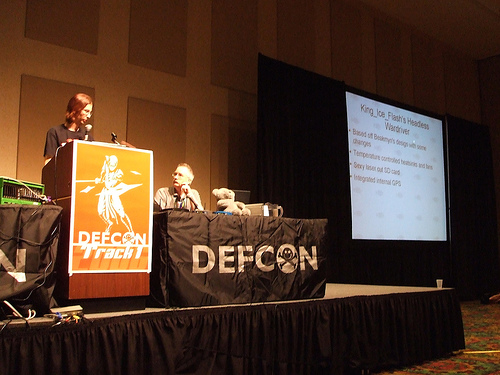
Thorn and Renderman giving their presentation on the Church of Wifi, with CoWPatty, the WPA rainbow table generator, and the WRT54G mods, which included my WaRThog.

215972088_93d246f6a7

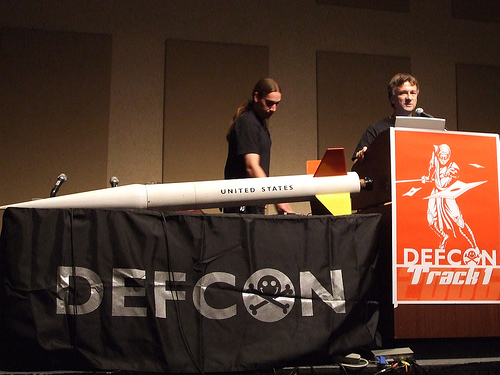
The war-rocketing guys, and their awsome rocket. I wonder how they got that thing past airport security.

219943777_5f1822fcfd

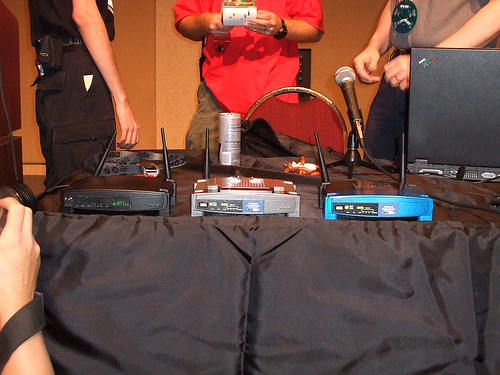
The WaRThog on the left, with two more of CoWF’s modified WRT54Gs.

219943269_35eee99859

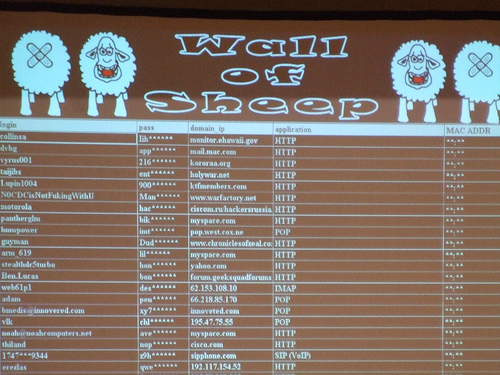
If you used DEFCON’s wireless network to check your email, access your corporate network, etc., but didn’t use any form of security (VPN, SSH…), you are bound to be in the Wall of Sheep. It displays captured user names, passwords, domains and access methods – I actually had the two colleagues travelling with me show up here, even though I told them to not even open their laptops while at the con.

See you next year!

Unix Course: More Shell Programming – Lecture 3

August 19, 2006 von Harald Puhl

The Insides of Athena Unix

Today we will discuss Shell Scripts.  I will start by discussing how and why they are used. 

You will find that most shell scripts are written for the bourne shell.  The reason for this is that all unix systems have the bourn shell, wehreas not all of them have the c shell.  It is possible to write a shell script that runs under the c shell, though, by putting

#!/bin/csh

On the first line of the script.  I will only discuss bourne shell programming here, and you should refer to the man page for the c shell for information on how to write shell scripts which use it.

Simple shell programs are often only one line long.  If there is a command line that you type frequently (often that involves piping the output of one command into another) you can enter that line into a file, and use it as a shell script which can be invoked by its name. For example, suppose you wanted a command that listed all the places you are logged in on a given cluster.

One way to do this would be to issue the command:

rwho | grep {your username}

Now suppose that instead you wanted to do this whenever you typed the command „findme“.  You would then create a file „findme“ containing the line above.  Before you can execute the shell script, you have to tell UNIX that the file findme is in fact a program and not just a text file.  You can do this by changing is mode to allow execute access:

chmod a+x findme

At this point, typeing „findme“ would perform those commands.  This could have been done using the alias feature instead, so what is so special about shell scripts?  Well, to start with, next time you log in, this command will still be there.  Further,  other people can use the new command you just defined (if they can access the file).
Shell scripts also can be much more complex (several pages for example.

—–
[] arguments

The next useful ability with shell scripts is arguments.  Suppose that you wanted to do the same as we did above, but you want to specify the user on the command line.  Lets call that command „findu“.  If I want to see where bcn is logged in I should be able to say „findu bcn“. Well, this is simple.  Instead of your username, you use the value „$1“.  $1 in a shell script expands to the value  of the first argument.  Similarly, $2 is the second argument, $3 the third and $0 is the name of the command itself.

So findu would look as follow:

rwho | grep $1

Note that arguments are used in the same manner that variables are used.

—
[] for, while do, if then else, and case

Like any other programming language, shell scripts allow various looping and selection constructs.  One of these is the „for“ statement.

It’s format is:

for variable in list_of_values
do
  statemtns
done

the list of variables can use *s to select file names.  If you leave out the in list_of values, the for statement will iterate through the arguments given to the shell.    

—
The form of the while do statement is:

while condition
do
  statements
done

This is like the while do statement in most programming languages, so I won’t go into details about it.

—
Then there is the if then else statement.
Its form is:

if condition
then
statements
[elif condition then]
statements
[else]
fi

The elif (else if) and the else statements are optional.  The if statements does just what you would expect.  If the condition is true, then it executes the then part.  If it is false, and if the is an elif, then it check that condition, and executes the then clase of it. If none of the conditions are ture, it executes the else clause.

 The last construct I will talk about is the case statement.  Its form is:

case $variable in

 v1) statement
  break;;
 v2)
  statement
  break;;
 *)

esac
There is also an until statement which is similar to the while statement.

———
[] test

So far, I have mentioned condition, but I haven’t mentioned how to specify conditions.  Conditions are really only the exit status of a program.  Hence, the way you specify a condition is to run a program which will return an error if a condition is face, and will return successfully if it is true.  This program is the test program.  I will very briefly describe the test command.  For more information you can say „man test“ when logged in.

Arguments for test are of the form N <primitive> M where N and M are variables or constants, and the promitive is

-eq, -ne, -gt, -lt, -ge, -le    for numbers
= and != for strings.

Alternatively you can say test -f filname to test for existance of a file, -s to check that the file isn’t empty.  -d checks if a file is a directory, -w if it is writable, and -r checks if it is readable. These aren’t all the options to test though. 

In many shell scripts, you may see square brackets around what looks like a test statement.  If square brackets are used, you don’t have to say test.  In other words,

[-f file] 

is equivilant to

test -f file

 
[] use of /tmp

When writing shell scripts, one will often need to use temporary files.  When doing so, a good place to sture these temporary file is in /tmp.  It is important that the temporary file you create has a different name than any file already in tmp.  To do this, you can use the shell variable $$ which translates into the current process number.  In fact, a good name to use is $0$$ which is the name of the current shell script followed by the process ID.  Ussing this name will prevent conflicts with other programs, or different invocations of the same program.

Another thing which is important is to have your shell script remove the file when it is done using it.  This way, /tmp does not fill up.
Files in /tmp in theory are deleted periodically, but the policy is different on different systems.  It never hurts to delete a temporary file that you no longer need.
———
[] interrupts

The trap command is useful for dealing with interrupts such as ^C or hanging up the phone line.   The form for the trap command is:

trap ‚command arguments‘ signal1 signal2

for example

trap ‚rm $tmp* ;exit‘ 2 1
———
[] exit

This brings us to the last command I want to describe.  The exit command.  The exit command alows one to exit a shell script.  Exit takes an argument, and returns that value.  A zero value usually indicated that the command has run successfuly, whereas a value of 1 usually indicates that an error has occured.

  • Unix Course: Introduction, Shell Commands – Lecture 1
  • Unix Course: The Shell, and Shell Programming – Lecture 2
  • Unix Course: More Shell Programming – Lecture 3
  • Unix Course: Unix Security – Lecture 4

My last day as a Fonero – bye FON, hello future

August 1, 2006 von Harald Puhl

Today is my last day as a Fonero, which is the way people registered in FON’s network are called (IMHO a rather ugly name). Why this decision? There are a number of reasons, and I have chosen to simply make a list.

  • The most important reason is that I have taken a position at a company that makes it unethical for me to continue participating in FON. I will no longer post on their forums; however, I will continue to post my thoughts about FON on my blog, and replying to Martin Varsavsky in his blog when I see it appropriate.
  • FON has been a downhill experience from day one. I ordered my “social” router, and got charged by PayPal, but no confirmation from the company, no tracking number, nothing. I emailed their support address, no reply. It eventually arrived, admitedly faster than the month or two some people were reporting on the forums. After a few futile attempts at configuring the router to work with my DSL line, and a couple of completely ignored emails to FON support, I simply gave up. The router is now waiting for a PCB to turn it into a WaRThog.
  • Every time I see a new crazy idea in Martin’s blog I feel more depressed about the FON project – does he really think WiFi is the way for homeless people to make a living, reselling VoIP services over Bluetooth? (don’t ask!). Where would he send them the money? Then there are the times when he takes a product and claims it was designed by FON, sometimes in secret collaboration with his backers Skype or Google. The latest is the Skype-compatible WiFi phone made by an Accton subsidiary – this is a design that Accton started way before FON even saw it, and way before Martin could have his logos photoshopped onto the mockups. As a matter of fact, out of the box this phone will not work at FON hostspots, as it lacks the browser required to perform user login – so they will have to work some magic.
  • The english and spanish forums are another source of disappointment, with daily posts from people complaining about the extremely poor support that FON is providing them. Some have even taken to posting comments on Martin’s blog to air their issues, something blogtiquette considers a no-no. I posted a few days ago about this particular issue.
  • They have followed an ill-conceived path to gaining publicity through bloggers, resulting in serious backslash from the spanish blogosphere (see here and here). Martin seems to think that by surrounding himself with top bloggers in exchange for dubious stock options or a seat in the board will get him a free ticket to stardom.
  • I believe that FON serves two purposes – one is to give a personal vehicle of shininess to Martin’s ego. See this post by Glenn Fleishman on FON’s crazy deal announcements, later called off as a lie by Speakeasy – typical example of how he manipulates a phone conversation into front-line news. Om Malik also reported on this particular issue. Martin is someone who cannot be seen as co-founding anything, but as a leader and innovator.
    Secondly, FON serves as an experiment for Skype and Google, who somehow convinced Index and Sequoia to go along. I don’t believe the two VC firms are into experiments, but FON would certainly provide good feedback to S & G about socializing WiFi, hardware distribution, and the adoption of the Bill model as a viable way to extend a WiFi network. Other stuff such as amount of logins at each location/router, number of registered users, daily passes sold, etc. would make nice colored graphs in the resulting corporate presentation.
    But, the problem is that FON is a huge fiasco in terms of hardware distribution, firmware development, public relations, and costumer support. I thus question the validity of any figures that come out of this rather expensive experiment.
  • Their firmware development process seems to be a closely guarded secret – but not for the same reasons Apple safeguards its own developments. FON started working with Brainslayer, the creator of DD-WRT, a free Linux distribution for Linksys (and other) routers. Apparently, Brainslayer was not very well treated by FON, and he parted to work in the Sputnik project, amongst other developments.
  • Just as Mark Evans did, I have voiced my concerns about FON’s business model and strategy – now that they finally launched the Bills, it looks more ill-fated than ever.

I find it really amazing how FON, with the $21.7 million they got in funding, cannot manage to hire a competent team of support personnel, outsource their obviously ill router redistribution system, and get some muscle behind the community effort. Martin Varsavsky is known in Spain for starting companies, pumping them up, and selling at the best possible gain – then leaving them behind with serious problems. Just look at what people think of Jazztel, or what troubles the Ya.com portal went through.

For me, the FON adventure is over, and a new, better adventure is starting. We will start disclosing things around the end of August, so if you want to stay updated, you are welcome to subscribe to the RSS feed.

  • « Vorherige Seite aufrufen
  • Seite 1
  • Seite 2

Seitenspalte

Tags

3D-Drucker Amazon AOL Apple asus memo pad Blackberry Dell DSL E-Book E-Book-Reader Ebay Elster Facebook Google Google Android Handy Hardware Hotmail IBM Internet Makerbot Microsoft mobiles Internet Netbook Prism Quantencomputer Rundfunkbeitrag Samsung samsung galaxy fame Samsung Galaxy Mega Samsung Galaxy Tab SchülerVZ Skype Smartphone Software sony xperia tablet z Suchmaschine Tablet Tintenpatronen Twitter Typo3 WebOS WhatsApp Xing Yahoo

Technik News Kategorien

Ausgewählte Artikel

LTE tilgt weiße Flecken und drückt aufs Tempo

LTE steht für Long Term Evolution und zugleich für den Vorstoß des mobilen Internets in die erste Liga der Breitband-Internetverbindungen. [...]. Heutige Angebote für mobiles Internet bringen 3,6 oder gar 7,2 MB/sec. Der Zugang erfolgt dabei meistens über einen Internet Stick der dank USB-Schnittstelle sowohl an einem Laptop wie auch am Desktop-Computer verwendet werden kann.


Externe Festplatte mit 3,5 Zoll, 2,5 Zoll oder 1,8 Zoll

Angeschlossen wird die externe Festplatte über USB, Firewire, eSATA oder einen Netzwerk-Anschluss. Vorsicht: Bei manch einer externen Festplatte stört ein lärmender Lüfter. Die kleineren Notebook-Festplatten sind 2,5-Zoll groß. Eine externe Festplatte mit 2,5-Zoll nimmt in den meisten Fällen über den USB-Anschluss Kontakt zum Computer auf und wird über dasselbe Kabel auch gleich mit Strom versorgt.

Inhaltsverzeichnis | Impressum und Datenschutzerklärung