Archive

Archive for the ‘Mac’ Category

Apple is against Bluetooth, but why?

September 14th, 2007 admin Comments off

First day with my shiny new iPhone, unlocked to work on Vodafone’s network – so far so good, pretty much loving it. Until I looked at the Bluetooth specs. Basically, this thing is only useful for mono headsets and carkits, and that’s it.

The iPhone has been certified under Bluetooth 2.0 + EDR, as can be seen in the BQB documents, but the PICS detail only handset and audio gateway profiles, with required signaling profiles such as RFCOMM, pretty much the bare minimum for a working Bluetooth hands-free system. What about the ton of other profiles, for example, A2DP, FTP, DUN…? Not included. The iPhone uses a CSR BlueCore4 Audioflash, which has 6MB of onboard FLASH memory, and could be upgraded provided that there is a host controller with access to the SPI port on the BC4. It seems that the iPhone uses Open Interface’s BLUEmagic 3.0 stack [PDF], which would imply an external host controller.

Now I’m starting to get confused – you usually choose a FLASH BlueCore if you intend to run software on it, be it CSR’s own stack, or a customized version of it. If you intend to use a host-based system, where the stack is handled by an external processor, you can buy way cheaper BlueCore ROM chips – and we’re talking between $1 and $3 a piece in savings. This may not seem much, but when multiplied it by Apple’s sales, you have a hefty sum. Below is a graphic that illustrates the differences between a host-based HCI system (left) and a standalone or ROM implementation (right):
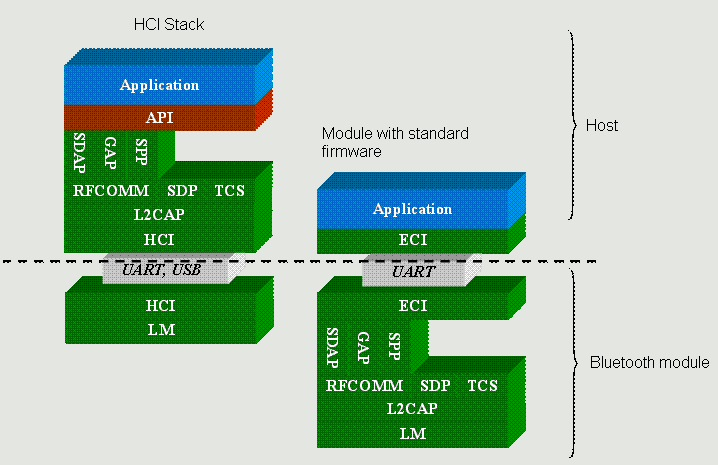
bt_profile_diagram_hci

The big question still is – why is Apple so Bluetooth-unfriendly? Did they have certification problems and rushed through the bare minimum specs to claim Bluetooth compatibility? This seems strange as the iPhone was certified by CETECOM, which probably is the most experienced lab on Bluetooth certification in the world. Same applies to MacBooks and Mac Pros, they feature a few more profiles like FTP, but not A2DP. Hoping for a firmware update to fix this mess, over and out.


Categories: Apple, Bluetooth, Mac, MacBook Pro, Wireless, iPhone Tags:

TUAW: Kismac is far from dead – they are just moving

July 30th, 2007 admin Comments off

I read with shock and horror this post on The Unofficial Apple Weblog about a post by Michael Rossberg, one of the developers of Kismac, that states:

There has not been a lot of time for KisMAC lately. However the motivation for this drastic step lies somewhere different. German laws change and are being adapted for “better” protection against something politicians obviously do not understand. It will become illegal to develop, use or even posses KisMAC in this banana republic (backgound: the change of § 202c StGB).
While I cannot do much about that for now, you probably can. Make copies of KisMAC and its source as long as the website is up! Do further development outside of Germany, even better outside the US and EU! If you are a German resident, you will need to fight for your rights.

The post has also been slashdotted, and drawn 155 comments last time I looked. Kismac is a very popular WiFi sniffer for Mac OS, also boasting key cracking functionality that is not present in other sniffers such as iStumbler.

My first reaction was to contact Geoff, one of the lead Kismac developers, who reassured me that Kismac is far from discontinued or deceased, they are basically relocating their servers (the SVN is already abroad) to a country that is not falling into draconian terms which remind us of unfortunate recent history. Since June 2007, new German law makes it illegal to pretty much do any form of investigation or development in the IT security field, as simply releasing a password cracking tool could land you in jail, and possibly even cause anti-terrorist provisions to be applied to you (anally, one would guess). Some comments from the Phenoelit crew also point in this direction – there is a disbandment towards other countries, and a tacit acknowledgment on the original sites that this is to comply with the new laws.

In Kismac’s particular case, Mick seems to have put the point across in pretty blunt terms, not stating that they are in fact relocating somewhere else, making it seem that the project was dying. I actually believe we will see some pretty neat developments in Kismac real soon…but that’s just a calculated hunch

Categories: Kismac, Mac, TUAW Tags:

Vodafone HSDPA with the Huawei E220 USB modem

November 22nd, 2006 admin Comments off

Went to my local Vodafone store to pick up the new Huawei E220 HSDPA USB modem, which with a 49 Euro monthly contract gives you 1GB of transfer at 1Mbps maximum, and free mobile to fixed landline calls – pretty good deal if you ask me. For 59 Euro you get 5GB of transfer, at the full 3.8Mbps that HSDPA offers. These are theoretical rates, as they will depend on a number of factors, such as how many people are also using the same cell, your coverage and the quality of the link.
We can argue all we want about how convenient WiFi is, being omnipresent et al, but in reality, it’s rather hard to get connected while on the road. Let’s examine the following scenarios, and you tell me the chances of getting connected over WiFi:

  • Riding the train or bus home.
  • Getting a lift from a friend in his/her car.
  • Opening your laptop at a random location (cafeteria, bar, etc. that you haven’t before scouted for open WiFi).
  • On a plane, waiting for the next free takeoff slot that you hope the pilot won’t miss because he was checking the fatness of his wallet.

Let’s be honest – free open WiFi is great once you have identified the locations where you can get connected, such as a friend’s house or the local coffee shop. Other solid commercial alternatives make it easier to find WiFi, as they tend to be present at well-known locations. Walk into any Starbucks or hotel, and you’re bound to find at least for-pay wireless.
For me, on the 30 minutes to 1 hour it takes to get home on the train or bus, being able to get connected is great. The convenience of simply opening the Mac and getting online beats the guesswork of WiFi. I tried getting the Mac working with my Nokia N93 over Bluetooth, but it was just too unstable – one day it worked, the next simply refused to even connect. A more in-depth review of the device is coming, once I get a chance to roam about with it for a while.

So far, installation on the Mac was pretty straightforward, download the setup package from Vodafone’s site (they don’t tell you this in the manual), which then enables the modem as a networking device. If you don’t follow this step, it can get recognized as a storage device, which is not particularly useful for a modem. The one thing I don’t understand is why it comes with a miniUSB cable that ends in two USB connectors, my guess is it’s power-related (some USB ports don’t provide the full 500mA they are supposed to provide).

Categories: Apple, Electronics, HSDPA, Hardware, Mac, Reviews, Wireless Tags:

So Macs cannot cut and paste files, either…

September 10th, 2006 admin Comments off

Bother of the day. For the two months I have been using my MacBook Pro, I hadn’t really looked into this one, but today was when it became “peeve of the day”. You cannot cut and paste a file in Finder. And Apple’s decision is final.

How can they honestly ask Windows users to switch, when extremely basic features that have been in Windows at least since 95 (I believe in 3.1 too, but cannot confirm this) are simply not there. In this thread at macrumors.com some explanations are “this is not present in order to prevent lost files”, and “what if you forget to paste?  the file is gone” – if this had ever been a problem in Windows, do you think it would not have been fixed? In Windows, if you “forget” to paste a file you have cut, it is never deleted. It never goes to the trash without passing Go and collecting $100. It just sits there, until the OS decides you have indeed forgotten to paste it.

Whatever you do next, Steve, get yourself a copy of Windows XP and copy all the features people find normal, before you ask them to switch. Oh, and I still love the Mac.

Categories: Apple, Mac, Rants Tags:

Macs DO crash, and aren’t that good at maths

August 24th, 2006 admin No comments

Today I am really peeved with my MacBook Pro. This is the second time I start this post, thanks to the almighty never-ever-hangs-honestly OS X. I intended to write a short diatribe about how remaining time for various things is not calculated right.

Let’s get the first part over with. Just before the crash, I woke up the Mac from suspended animation, and surprisingly, the battery monitor reported 158:34 hours of battery life remaining…whoa! Lets assume the average battery life of 3 hours corresponds to a battery capacity of 4Ah (Ampere-hours) – then my Mac carries a 118Ah battery. For reference, your run-of-the-mill car battery has around 70Ah. Go figure.

The second time miss-calculation happened when I extracted an archive with StuffIt, which told me I had over 300 hours to wait…when the file size was only 2MB. I will try to take screenshots next time. It is obvious that these are dumb figures, but one has to wonder why there isn’t a top limit on the values, mainly so that it doesn’t look ridiculous.

Now, for the fuming rant. I am heading back home on the bus, and to kill time, I decided to write this post. To connect to the internet while on the move, I use a Nokia N70 over Bluetooth, which gives me 3G speed (you at the back, stop giggling!). Suddenly, and before I had time to click ‘Save and Continue Editing’ for the first time, the connection froze. I tried to disconnect, and Internet Connect remained stuck on “Disconnecting…”. There was no way to get it to actually finish the disconnection process…then I noticed the N70 was actually frozen too! Cursing my luck, I removed the battery from the phone, switched Bluetooth off on the Mac, tried to kill Internet Connect using the terminal…nothing. Whether the Mac froze the N70 or the other way around is unknown, but it is clear that both have a serious flaw for this to happen.

Shutdown time. I copy-pasted the text I had written into TextEdit, and saved it to the desktop. Then, without closing TextEdit, I tried to restart the Mac, but it was having none of it. As a last attempt, I held the power button down for five seconds, and finally, it shut down. The surprise came after restarting – the text file was gone from the desktop, and with it my half-written post. There was no trace of it anywhere, neither in Finder’s nor in TextEdit’s recent file list…Is this a serious problem?

I admit that so far, the Mac has proven very stable, with very few problems, and minor ones at that. But if it is possible to have incidents like the one I experienced, then the message about how Macs are un-crashable is simply not true. I know that Robert Scoble had a similar problem with a machine just like mine, his post relating to Dave Winer’s crash report. In my case, the damage wasn’t that great, but imagine this happening towards the end of a long process, like encoding a long video edit. Mac accolites will surely say “But Windows crashes too!”. I’d answer “But Microsoft doesn’t go around publishing agressive campaigns saying how Windows PCs are rock-solid in comparison with the monkey-on-acid-squeek-of-death”.

I love my Mac. But I disagree with the hype.

Categories: Mac, Rants Tags:

OpenOffice – no go on Mac OS X

July 24th, 2006 admin Comments off

Today I received an email with some technical specs I was supposed to review, but the document came in OpenOffice Write format (.odt), and since on my MacBook I only had Office installed, there was no way to open it.

Checking the OpenOffice.org site, it appeared a version was available for OS X, but in the traditional open source way, I was met with thinks like:

“en-US builds for Intel based Macs will be listed here as soon as they passed QA. In the meantime please” (The phrase really ends like this, I am quoting vervatim!)

…please…what? What am I supposed to do in the meantime? Ask the guy who sent me the document to re-send it in Word format? Oh, wait, here is the solution:

“The builds use X11 and are meant for the user who doesn’t care that much about look but functionality and cross plattform integration and usability. Other prospects are the Darwin community and the Unix-savvy MacOS X user community and forming a platform for us to build the Quartz and Aqua tracks for the traditional Mac user.”

I thought Intel Macs had only been around for a few months, so how can there be a tradition? Last, but not least, the list of mirrors for the english version were empty. No problem for German or French users, so congrats to you, lucky people! The fact it was empty explained the “in the meantime” statement.

What is this rant all about? The discussion I had the other day with a diehard opensource defender – the type that scream “Linux will conquer the desktop next year, really, this time” any chance they get. I think it is really great that people are willing to donate their time to contribute to opensource projects, some as large as Linux or OpenOffice, but they have to think in terms of reality, not utopia. To think Linux will take over Windows on the desktop, or that OpenOffice will replace Office, at least in the short or medium term, is wishful thinking.

I expect to be beaten to death by the diehard Linux fans, but there is no way my mother would know how to “vi your X86 configuration file to change the video adapter so that it works”. Until Linux or OpenOffice offer similar experiences than Windows or Office, there will stay in niche or very specific target groups. Companies are migrating to these operating systems and office suites, yes, but they usually have the resources to implement the transition, both from technical and training standpoints.

So, good luck with the project, I honestly wish it every success, and I am sorry that I am not a competent UNIX programmer so I can contribute. But from a user’s perspective, it has some way to go.

Categories: Linux, Mac, OpenOffice Tags:

No A2DP in OSX – maybe if Apple made a Bluetooth stereo headset…

July 2nd, 2006 admin Comments off

Last night I was watching a DVD on my MacBook Pro, and remembered that I still kept a Motorola Bluetooth stereo headset from the time I was working at SouthWing and we designed such devices.

Bluetooth stereo headsets use a profile called Advanced Audio Distribution Profile (A2DP), which allows them to receive medium-quality audio at 16kHz from compatible devices. Most USB Bluetooth dongles sold recently have the profile in their drivers, and there are some mobile phones from Nokia, Samsung and Motorola that also feature this profile. The advantage is that you can listen to music wirelessly, and also control the player from the headset, as they feature the usual forward, back, play and pause controls.

Once I found the headset, I switched on Bluetooth on the Mac, and started the pairing process. The headset was recognised just fine, and pairing completed, but I noticed that it had been connected as a Handsfree device, with A2DP nowhere to be found. Since there doesn’t seem to be a method of connecting the headset permanently, so the audio is always routed from the Mac to it, the attempt was frustrated – I couldn’t even listen to the DVD in low-quality audio.

Why has Apple left out this profile, is it a blunder, or a calculated approach? As to this date, Apple doesn’t manufacture or resell any Bluetooth wireless headsets (only one can be found at their store, and it comes with a dongle for the iPod, so it doesn’t count). So, why would they have an interest in adding the A2DP profile, so that we could use any other headset? If they are in the process of designing their own, they might want to keep the profile away from Macs until they launch it.

Then again, if we give Apple a vote of confidence that they are not that insidious, it could be a blunder. And a big one. Windows has been able to work with A2DP headsets since late 2005, so they have had plenty of time to add the profile to their Bluetooth stack.

A few myths and facts about Bluetooth, versions and profiles for the curious:

1. Profiles are mostly independant of the Bluetooth version. It is perfectly possible to have A2DP in a V1.2 Bluetooth device, just the same as a V2.0 + EDR can have just two profiles and miss many of the usual ones – the mix is up to the manufacturer and driver supplier.

2. EDR stands for Enhanced Data Rate – this does not increase the range, just increases data throughput from around 700kbps to around 2.1kbps, by using a different modulation scheme. The Bluetooth protocol and profiles stay just the same – the advantage is that since data takes almost 1/3rd of the time to send compared to non-EDR devices, there is a considerable power consumption reduction.

3. “Device Y doesn’t support profile Z”. Again, this is up to the manufacturer, and it’s hard to add new profiles, specially in embedded devices. Some chipsets use masked ROM, which means that the Bluetooth stack, profiles and other settings are burned at the time the silicon is printed – so, no software updating on these. Masked ROM is considerably cheaper, although has an initial setup cost of $100.000, so it’s only good for high-volume production runs. The chips can drop $1 to $2 compared to the flash EEPROM counterparts.

As an example of a very poorly implemented Bluetooth solution we can find the Logitech MX5000 keyboard and mouse combo – it sucks. A lot. I am preparing a review that will try to investigate why it does the stupid things it does, such as repeating the first letter you type when it wakes up a dozen times, or why the mouse starts wondering around the screen as if it was possessed by a poltergeist.

Categories: Electronics, Hardware, Mac, WiFi, Wireless Tags: