• Zum Inhalt springen
  • Zur Seitenspalte springen

Technik News

Das Blog zu IT, Mobilfunk & Internet

Archiv für März 2007

Fonera overheating – are we cooking yet?

März 17, 2007 von Franz Hieber

You probably have seen the video on YouTube about a molten Fonera, apparently due to overheating, which shows the plastic case completely deformed. Gizmodo (also in spanish) and other sites are also reporting on this. As usual, Fon has censored the post on their forums that broke the story, but alas, thanks to their partners at Google, here is a cached version. Even Martin Varsavsky seems worried about this. It seems the damage is obviously from heat, but could it have come from the Fonera itself?

I, and others, have our doubts about wether this video is a fake stunt, or a true story. It is true that the Fonera overheats, much more than would be expected from a consumer-electronics product, but to the point of causing physical damage to the plastic case?

The heat problem

Heat in electronics mostly comes from dropping voltage by converting current into it, in our case, the voltage regulator in the Fonera drops 5V to 3.3V at 500mA, resulting in the dissipation of 850mW. That’s right, we are dumping 850mW right into the atmosphere in the form of heat. This brings the operating conditions very close to the maximum ratings for this regulator, which has a maximum rated thermal resistance of 90ºC/W, my calculations put the operating conditions at 88ºC/W. Additionally, the wireless section of the Fonera is also converting a lot of energy into heat.

The measurements

After I finished my tests, I got a comment from Pobletewireless, regarding his own measurements of the heat problem, which are shown in very cool thermographs (no pun intended!) – much nicer than my rather rudimentary method.

I measured the temperature of the Fonera using a thermocouple connected to a Fluke 123 Scopemeter via an 80TK thermocouple module. The thermocouple was placed in between the heatsink and RF shield, the case closed, and the Fonera powered, as can be seen in this picture:
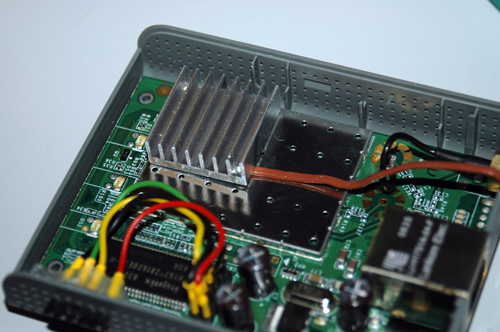
Thermal probe in the Fonera

After 10 minutes operating normally, the temperature had risen to an average of 72ºC, with a peak of 80ºC.
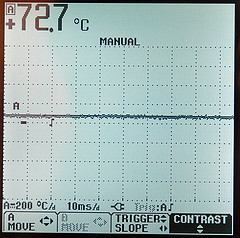
The average temperature of the Fonera

The second batch of measurements were performed drilling four small holes to allow the thermocouple into the casing, the locations are shown in the following picture:
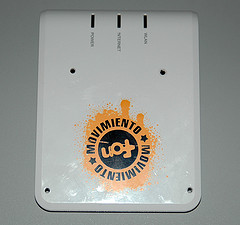
Probe holes

Maximum temperature at one corner was 43ºC. Next, an attempt was made to melt the white lid of the Fonera, by exposing it to a high temperature airflow from a paint-stripping gun, and at the same time, applying slight pressure from below. The thermocouple was used to measure at which point the plastic became maleable, and deformation started. At around 100ºC, the plastic was soft enough that a solid object could change its shape – this is in line with ABS plastic thermal properties, which state a deflection temperature around 100ºC, depending on specific material composition.

As the deflection point test resulted as expected, the lid was then exposed to an airflow at 280ºC for two minutes. The result of this exposure is shown in the pictures below:
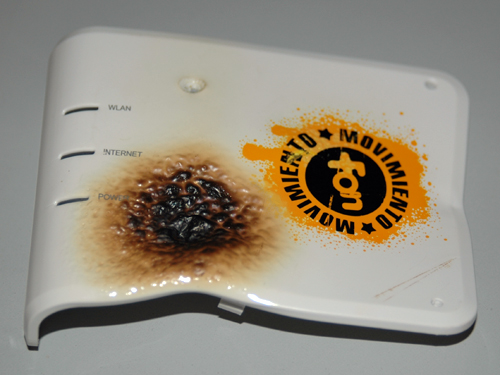
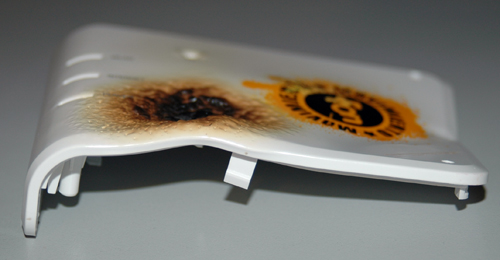
Fonera lidFonera lid 2

It’s obvious that some deformation has taken place, with discoloration and charring on the point where heat was directly applied. However, the front side of the lid had mostly retained its shape.

Conclusions

The Fonera does indeed run very hot, much hotter than it should, if anything, for the good of the internal parts. Electronic components are sensitive to heat, with maximum ratings given by each manufacturer in terms of storage and operating conditions. The higher the temperature, the lower the service life of any given component. Some are affected more than others, most notably, electrolytic capacitors have a high sensitivity to heat, as it can evaporate the electrolyte quicker, causing it to fail. The capacitors in the Fonera are made by Taicon, a taiwanese manufacturer, and are max-rated for 105ºC. From the datasheet [PDF], at this temperature, the capacitor will fail after some 2000 hours, around 83 days. Following Arrhenius’ Law, and since the area around the capacitors was found to be at around 52ºC, their expected life would be 7800 hours, or about 325 days – what a coincidence, almost a full year, after which your warranty has expired. Comparing the Fonera to a Meraki Mini, one realises that there is a serious design flaw, as apart from the Mini having a switched-mode regulator, the wireless section shares exactly the same design as the Fonera. The temperature measured outside the casing of the wireless section indicates that the junction temperature of the components inside has to be ridiculously high. So, one conclusion is that the Foneras will eventually fail due to overheating, and it will probably happen sooner than later.

On the deformation / melting video – in my opinion, it’s not real. At least, it couldn’t have happened without the Fonera reaching temperatures around the whole casing that would have caused some components to blow up (for example, the capacitors). The Fonera could not have undergone such an extreme temperature, and still function as shown on the video. The temperature gradient between the heatsink and one corner of the case is almost 2:1, thus, to reach a deformation temperature of say 200ºC at the corner, the heatsink must have been running at 400ºC! A final bit of evidence – the sticker. If you look closely at the video, the sticker on the bottom of the Fonera looks almost unscathed. Here is a picture of what it looks like after applying a 250ºC airflow for 30 seconds, which causes the plastic to deform:
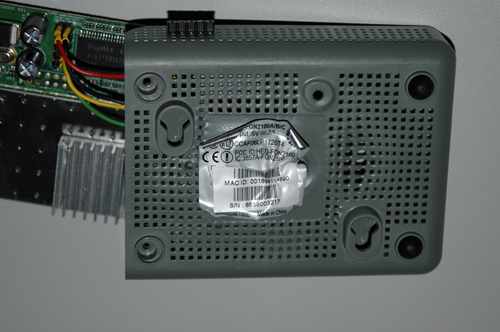
Fonera bottom

Obviously, a more prolongued exposure would have damaged it even more. In all honesty, I would love to get more details from the guy who made the video, as it stands right now, I’d call it a hoax.
Autopsy of a Logitech MX5000, and the reason why it sucks

März 14, 2007 von Harald Puhl

I wrote before about the Logitech MX5000 Bluetooth keyboard & mouse combo, and there are plenty of posts around the web that confirm that the product sucks – badly.

To recap a bit, the problems are random reboots of the keyboard, disconnections of keyboard and mouse, erratic mouse behavior (including spontaneous motion of the cursor), and repeated keystrokes after the keyboard has not been used for a few minutes (resulting in things like “aaaaaaaafter the news…”). In all, a very frustrating and annoying experience, for a rather expensive combo. Logitech seem to acknowledge the problem, but I have not yet seen any form of update that could fix this, and my theory is that the problem cannot be fixed with a simple software update.

Declaring the keyboard and mouse defunct, I performed an autopsy, which revealed a few interesting facts (details after the jump):

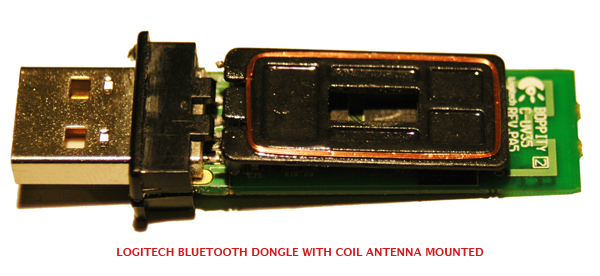
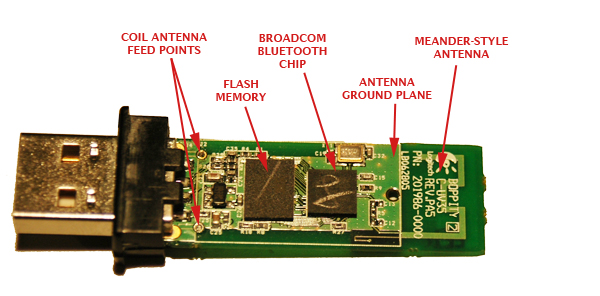
  • The Bluetooth dongle has a very very strange RF design – it uses a normal groundplane meander PCB antenna, but then it has a copper-wire loop antenna on top.
  • Dongle and keyboard use Bluetooth chipsets from different manufacturers (CSR and Broadcom), in theory interoperable, in reality…well.
  • The touchpad uses a very crappy sensor design, which explains the lack of responsiveness and uselesness of the scrolling controls.

Let’s start with the dongle. Below are a couple of photos of the opened device, the first with the loop antenna in place, the second with it removed, showing the meander. If someone with better RF knowledge than me can explain why this makes sense, I would be grateful. The design of the loop itself is wrong for 2.4GHz, having a wire length about 10 times larger than what would be required given its size.

dsc_1279dsc_1280.jpg

The dongle uses a Broadcom BCM2045 chipset, with a 4Mbit flash memory onto which the firmware is loaded. The meander is a PCB track designed for 50ohm impedance, coupled to the chipset via a normal inductor-resistor-inductor matching network. Noticeable is the lack of baluns or filters, I’ll have to check the datasheet (if it’s publicly available) on this aspect.

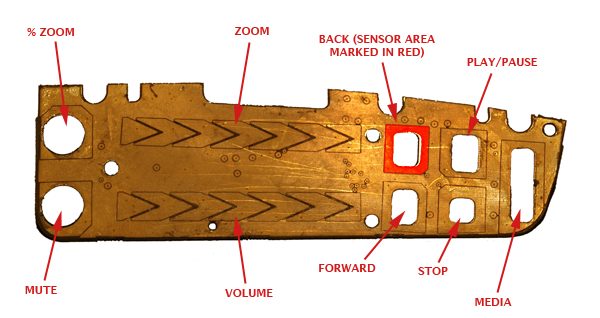
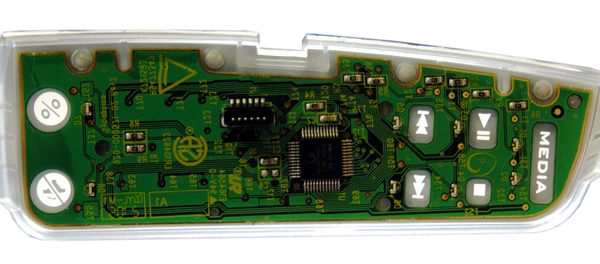
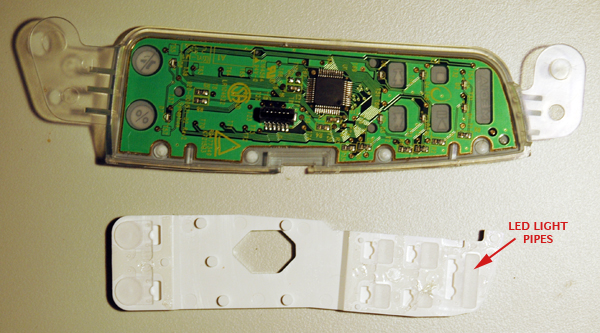
Let’s take a look at the keyboard, starting with the touch controls. These are built into the keyboard as a separate module, linked to the main control board with a flat ribbon cable, and consist of three main pieces – the PCB and touch sensors, external case with printed cover, and a plastic support with built-in LED light pipes. The controls are made with a layer of gold-plated copper, printed on the underside of the PCB, and on the top side lives the control chip, made by Synaptics (who also makes touchpad systems and other stuff).
dsc_1289.jpg

The principle by which these type of controls work is capacitance changes. When you place your finger near the sensor, a capacitive effect takes place (using the air and any other material in between as dielectric), which can be measured. It is very small, but enough to give an indication that a finger is present. There are a few rules that one must follow when designing such touchpads, as any interference in the capacitive effect can have negative results on the ‘feeling’ of the controls. Namely, ground planes have to be carefully controlled, and usually placed away from the sensor area, the sensors have to have a minimum size in order to be effective, and any trace routes from the sensor pad to the control IC have to be kept tight, avoiding cross-overs and other disturbances.

I am not familiar with the Synaptics chip, but I have worked with Quantum Research QProx devices, and I cannot see how the physics of capacitance could be avoided in either case. The MX5000 design violates all these rules. The sensor areas are irregular, with a gaping hole in the middle to allow for LED light to pass through, there are ground planes all over the PCB, the tracks meet and part at various spacings and passing right next to ground planes. The biggest joke seems to be the ’sliding’ sensors for the volume and zoom. These are depicted on the face of the keyboard as smooth analog paths, as if one could go from minimum zoom or volume to maximum by sliding the finger to each end of the vertical scale. The truth is that to change the volume in any significant way, one has to repeatedly slide the finger along the whole path of the scale several times, and in some cases, the detection doesn’t work. You end up looking demented, rubbing away the side of your keyboard repeatedly! As is shown on the photo, the sliding scale has only 7 distinct sensors, thus giving you a maximum of six detectable steps in either direction (each step is signaled by the triggering of one sensor, then the one adjacent, determining direction of finger travel). It would be a bad idea to place the whole volume or zoom range on a scale of six steps, and so they settled for the crazy-monkey-rubbing-keyboard action instead.

The next two pictures show the PCB inside the plastic assembly that houses the faceplate. Notice how the cutouts allow for light from the LEDs to be piped towards the labels and icons.

dsc_1292

dsc_1294

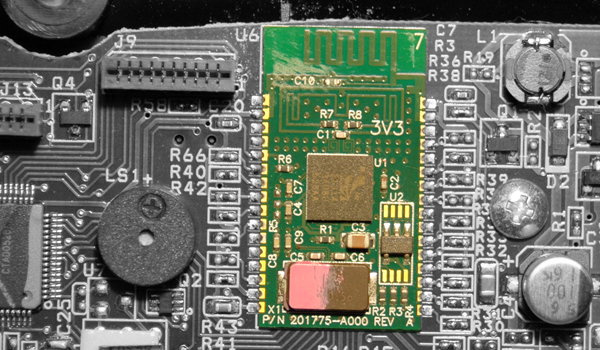
And finally, the last part of the broken equation – the Bluetooth module on the keyboard. It uses a CSR BlueCore3 ROM, which is cheap but cannot have its firmware modified after the die has been printed, meaning whatever bugs you had in the device will be there forever. Again, the module uses a meander antenna. Now, I am not too familiar with the Broadcom chipset, but I have worked with CSR chipsets quite a bit, and know they provide a balanced antenna output, this means that to use an antenna such as a meander or chip, you have to go through a balun. I don’t see a balun on the MX5000’s module, and so it appears they have attempted to balance the antenna with another set of meanders, which can be seen between the chip and the large main meander in the picture below:

dsc_1296

Again, this design doesn’t seem to be the best in terms of RF performance, specially when you have a large inductor nearby (L1).

Conclusion? Don’t buy one of these, if you want to go wireless, get one of the non-Bluetooth (some also work at 2.4GHz) keyboard/mouse combinations, and I would still say get a Logitech, as they make some very good ones, such as the MX3000. I’ve always used Logitech, but the MX5000 has been a real lemon.

Adding a TCP/IP stack to the BlackBerry 8707v

März 10, 2007 von Harald Puhl

My first BlackBerry was a 7100v, the first that had the slim form factor and two letters per key – which despite what anyone says, is still more uncomfortable than a full-sized thumb pad. After a couple of years, I have returned to the BlackBerry (but still keep a Nokia N93 handy for pictures & video), getting an 8708v from Vodafone. Main features are a slower non-Intel processor, but CDMA 3G/UMTS technology, which makes surfing and downloading attachments much faster than over GPRS.


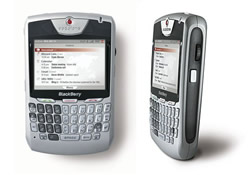
BlackBerry 8707v

After a couple of days of trying to load my favorite software on it, I realized that the 8707v has a very big, very upsetting flaw for anyone who wants to use it beyond email, scheduling and phone duty. It doesn’t have a TCP/IP stack, like other BlackBerries – so connectivity has to be through BES/MDS or BIS, leaving out many applications which need a direct socket connection, for example, the very excellent jmIrc, which kept on saying “could not open tunnel” when trying to get connected. Checking out BlackBerryForums, and Jan-Piet Mens’ blog, the truth started to sink in – RIM had deliberately left out the IP stack, citing unknown problems as the reason. The official statement is here.

Some applications worked, such as Idokorro’s rather good SSH client, and IM+, configured to use a BIS connection. Performance was very poor though, taking a very long time to establish any connection.

Yesterday, I remembered using Opera on the 7100v and being a nice browser than the built-in one, so I set off to download and install it. Not exactly sure how it used to be installed in the days of the 7100v, but this time, when launching Opera, it attempted to run through a series of “tests”, eleven in total, trying to determine how to get connected to the net…and they all failed. A few minutes later on BlackBerryForums, this little gem showed up – explaining the method to configure an APN for the mobile operator in question in order to allow TCP connections – but surely it had to be wrong, the article refered to the 8707v. Well it turned out to be correct, and now, I have a TCP section in Advanced Options, where I can enter an APN, user name and password. I went ahead and tried Vodafone’s APN for Spain, airtelnet.es (Vodafone’s entry into Spain was through the purchase of Airtel, and it seems some things always stay the same!), and it worked! jmIrc also succeeded in connecting to the Freenode IRC server, as all other applications that weren’t working did.

What did installing Opera Mini do? Add a service book? Unlock the dormant stack, or install it? If anyone has an explanation, please do let me know – and to those who were undecided about the 8707v due to the lack of IP connectivity, this seems to be a solution.

Vodafone 3G failure in Barcelona, over 24 hours without incoming calls

März 1, 2007 von Harald Puhl

If you have a 3G/UMTS phone and you are moving around Barcelona, it is likely that since Wednesday morning you could not receive any voice calls or SMS messages. Vodafone admitted that they had a failure in some parts of the network in the city of Barcelona, but didn’t give an estimated timeline for fixing the problem. Today, at 4pm, they still do not have an estimated time to solve the problem, and I could still not receive calls. This is extremely serious, as anyone having to receive important or emergency calls will not get them, and he will not know a thing about it. Your phone shows you have coverage, and you can dial out, so you are unaware until you meet someone that yells at you because they couldn’t get in touch for hours.

Vodafone support is usually quite good, but in this case…they really blew it!

Seitenspalte

Tags

3D-Drucker Amazon AOL Apple asus memo pad Blackberry Dell DSL E-Book E-Book-Reader Ebay Elster Facebook Google Google Android Handy Hardware Hotmail IBM Internet Makerbot Microsoft mobiles Internet Netbook Prism Quantencomputer Rundfunkbeitrag Samsung samsung galaxy fame Samsung Galaxy Mega Samsung Galaxy Tab SchülerVZ Skype Smartphone Software sony xperia tablet z Suchmaschine Tablet Tintenpatronen Twitter Typo3 WebOS WhatsApp Xing Yahoo

Technik News Kategorien

Ausgewählte Artikel

LTE tilgt weiße Flecken und drückt aufs Tempo

LTE steht für Long Term Evolution und zugleich für den Vorstoß des mobilen Internets in die erste Liga der Breitband-Internetverbindungen. [...]. Heutige Angebote für mobiles Internet bringen 3,6 oder gar 7,2 MB/sec. Der Zugang erfolgt dabei meistens über einen Internet Stick der dank USB-Schnittstelle sowohl an einem Laptop wie auch am Desktop-Computer verwendet werden kann.


Externe Festplatte mit 3,5 Zoll, 2,5 Zoll oder 1,8 Zoll

Angeschlossen wird die externe Festplatte über USB, Firewire, eSATA oder einen Netzwerk-Anschluss. Vorsicht: Bei manch einer externen Festplatte stört ein lärmender Lüfter. Die kleineren Notebook-Festplatten sind 2,5-Zoll groß. Eine externe Festplatte mit 2,5-Zoll nimmt in den meisten Fällen über den USB-Anschluss Kontakt zum Computer auf und wird über dasselbe Kabel auch gleich mit Strom versorgt.

Inhaltsverzeichnis | Impressum und Datenschutzerklärung