• Zum Inhalt springen
  • Zur Seitenspalte springen

Technik News

Das Blog zu IT, Mobilfunk & Internet

Archiv für September 2006

Unix Course: Unix Security – Lecture 4

September 26, 2006 von Harald Puhl

The Insides of Athena Unix

Today we are going to talk about Unix security.  The first topic will be the first security system you run across when using Unix.

[] Password Security

Next we will talk about some of the implications of the networking programs which are available.

[] Networking

We will then talk about what it means to protect a file

[] File Security

After that, we will discuss ways for keeping information even more private should you decide to do so.

[] Encryption

I have no intention on teaching you how to break into a system. Instead, I hope to point out some of the things you should do to make sure that you are not the victim of someone elses attempts to breach security.

———————————————————————-
[] General Overview

UNIX is not a „secure“ operating system.  It really wasn’t designed to be one, though.  But, what do we mean by security?  Let’s start by considering several types of security.  There is physical security. This is made up of things like locks on doors, and the Campus Police. For some systems this is sufficient.  For instance, if a computer, and all the terminals which can connect to it are in a locked room, then the system is as secure as the lock on the door is. 

What happens, though, when you add a dialup?  Or a network?  No machine which can be accessed from the outside should be considered secure.   The first line of defense is passwords though.  The idea is to keep people who aren’t supposed to be using the machine from being able to do so.  If they can’t do anything at all, then their not going to be breaking security.  Of course, not all password systems are so great.  It is often possible to obtain passwords by guessing them, or
through various other means.

The last type of security is of particular importance to Athena.  What do you do in an anvironment where lots of people have accounts, but not all these people can be trusted.  You need some way of controlling access to resourses such that people have access to their own files (or other files in certain ciscumstances), and only limited (if any) access to other peoples files.  It is at this level that keeping a system secure becomes a problem because the potential intruder has so many more attacks he can try.

[] Password Security

Let me start by talking about password security.  Under UNIX, passwords are stored in the /etc/passwd file.  This is a publicly readable file, so clearly, something has to be done to protect the passwords.  Passwords are encrypted in such a way that they can not be converted back into the plaintext they were generated from.  When you log in, the system asks you for your password, it then encrypts the password, and compares the encrypted version to what is stored in the /etc/passwd file. 

There are several attacks to breaking this security method.  One approach is brute force.  An attacker tries all possible passwords until he finds the correct one.  This attack is impractical because of the time required. 

Fortunately (for the attacker), most people choose common passwords. There username, their name, or words that are in the dictionary.  In one experiment (described in „Password Security: A Case History“ by Robert Morris and Ken Thompson), 3,289 passwords were collected over a along period of time.  Of these,

15 were single ASCII characters
72 were strings of two ASCII characters
464 were strings of three ASCII characters
477 were four alphanumeric characters
706 were five letters either all upper, or all lower case
605 were six all lower case letters

492 appeared in various available dictionaries

A few things have been done to make things more difficult for the attacker.  An encryption algorithm is used that takes a lot of time to run.  This tends to increase the time required to guess passwords. Passwords are also „salted“.

One attack that has been used is to come up with a dictionary of encrypted passwords, and compare the encrypted password in the password file with the encrypted dictionary.  This takes a lot less time per entry than having to encrypt the plaintext word you want to test, and then comparing it to the encrypted password.  Salting a password means that a random number is selected when the password is initially created, and added to the plaintex before it is encrypted.
This random number is then also added to the encrypted password before it is written to the password file.  When a password is checked, the same random number is taken from the encrypted password, appended to the plaintext which is then encrypted, and the result compared with the encrypted password.

Salting the password means that there are now 4096 versions of each password that are possible.  Thus, an attackers dictionary would have to be 4096 times as large.

[] Networking

The availability of remote login and remote execution in a networking environment (as exists with Athena) introduces many new ways to breach system security.  The problem is how to authenticate users across the network without requiring them to enter their password again.  The way this has been accomplished is through the concept of a „safe host“.  A job can log in, or remotely execute commands without a password only if the user is logged in from a „safe account“ on a „safe host“.

Networking has presented many other problems for system security, but I do not intend to discuss them at this time.

———-
[] File Security

What does it mean to protect a file?

Under UNIX, there are several fields in the protection of a file.  The first three bits control access to the file by its owner.  The next three define the access by other people in ones group (people in the group that owns the file).  On Athena, most peoples groups are „mit“, so this group field is really just another field for „world“.  The last set of three bits define the access for everyone else.

The bits on a file control read, write, and execute, but one also needs to be concerned with the protection bits on directories.  If someone has write access to a directory, then they can create, and delete files contained in it.   Read access to a directory gives one permission to look at the directory (with ls for example). Execute access conveys permission to connect to the directory and to search it for a file which you know the name of.

It is also important to note that someone with access to the root account can read, or write ANY file on the system regardless of the protection.  Pleople who have this access include Athena staff, some consultants,  some system wizards, and occasionally someone who has managed to break the systems security.  On Charon, certain SIPB member have root access.

When you log in, your .login sets a „umask“ which defines the default protection you want to give files you create.  This mask is 3 octal digits defining the bits that you DO NOT want to appear in the protection for the various entities (owner, group, and world). Further, if you have given niether read, nor execute access to a directory, then other users will not be able to access files beneath that directory regardless of the protection of the individual file.

[] Encryption

As you can see, there is no way to keep a file totally secure under UNIX.  Since the file can’t be secure, you may want to use encryption to keep the contents secure.  Currently there is a program called crypt which can be used to encrypt files.  Unfortunately, the algorithm used in crypt has been broken.  In the near future, Athena will be distributing a new algorithm (I believe based on DES) to replace crypt.  This algorithm is believed to be more secure.

  • Unix Course: Introduction, Shell Commands – Lecture 1
  • Unix Course: The Shell, and Shell Programming – Lecture 2
  • Unix Course: More Shell Programming – Lecture 3
  • Unix Course: Unix Security – Lecture 4

The real FON statistics – lies, manipulation or fantasy

September 25, 2006 von Franz Hieber

On September 14th, FON launched the new version of their online mapping service, after several months of complaints from users that the service wasn’t up to scratch, and announcements stating the development team was working on the problem.

On a first look, the maps look really nice – they use Google Maps, by default in the mixed view, where you see a satellite image and an overlay of roads and placemarks. I will not bore you with the details, as it is better that you check them out yourself and make up your mind.

This post is not intended as a review of the service itself, but rather, a revelation of the real figures behind FON’s network – peeking under the layer of PR and flamboyance. Martin Varsavsky is always boasting about FON being the largest WiFi community of the world – in my view, this is not accurate.
During months, FON has been claiming to be a “movement”, with a marked communist image behind (the marching workers, the spray-painted logos, etc.). This movement was supposed to kill mobile operators, who currently oppress people with their sky-high tariffs. We could go into a long debate just on this topic, but lets move on. During all this time, FON has suffered untold problems with staffing, PR mini-scandals, shipping broken routers or taking weeks and months to even send them out, not replying to repeated requests to support@fon.com, and blatantly ignoring the public forums, where the community behind the movement was expressing its increasing anger and frustration.

The blinding truth – less than 3.700 routers online worldwide

Digging a bit deeper into the workings behind the maps, I have found that there is a method to run a query to retrieve all the hotspots in FON’s database, not just two hundred, or those in a particular region. If you want to see an example, click here. This is a query that will return all hotspots on the planet that have been FONing home during the last hour. It can take a little while to load, so be patient. Until a couple of days ago, results were returned in XML format, which has been dropped in favor of the new plain, comma-delimited format.

I predict that FON will not like the above link, and thus will try to either change the format of the php call, or add artificial records to confuse the application I have written to process the data. First, I wrote a simple application using RealBasic (having been a long-time Visual Basic acolyte, it is a welcome change, allowing me to code under Mac and Windows transparently) – source code here. A screenshot of a full run is shown below.

Application screenshot

Just from the details shown after the run, a few enlightening facts surface:

  • The highest user ID found is 92.192, but the total amount of processed records is only 55.384. I have to investigate a bit further, but it appears that in some cases, a record is stored twice, once holding the user type (Linus, Alien or Bill), and again holding the router mode (online or unknown). This is the reason why some people see both the orange dot and the green halo on their locations at maps.fon.com, and also the reason why at this time I cannot confirm that the real number of Foneros is 43.896.
  • There are only 3.674 routers online on the entire planet. So much for the largest WiFi community in the world. The other 7.814 are registered routers, from which nothing has been heard during the last hour. These figures have been checked a few times during the last few days, and they stay more or less constant.
  • Out of the entire user base, only 1.317 have become Bills. So much for milking one’s WiFi.
  • The highest router ID found in the results was 19.889, so if we add offline and online routers (best case scenario), then around 8.401 routers have never been registered, representing 42.2% of sold routers. Extrapolating this to the 1 million routers Martin wants to sell would results in a loss of $10.55 million!.

Looking at the per-country statistics (per-city could be made, given some extra time and coding), some curious details also stand out:

  • There are two registered routers in Afghanistan – but neither is online. Not surprising, considering the amount of explosives that have been dropped on the place.
  • China and Taiwan have 9 routers registered, but none online. Martin was blogging about his expansion into Asia, which looks rather bleak right now. 165 Foneros are registered however.
  • Germany and Spain have around the same number of registered routers, although Germany almost doubles Spain in the number of online routers.
  • The United States ranks third in number of registered and online routers, however, it holds the highest number of Bills (408). The next is Germany, with 237.

Finally, we can derive a few figures from these numbers. These are highly interpreted, and must be taken as theoretical extremes.

  • If FON sold one $3 one-day pass every day of the year on each of the online routers, it would make a gross income of $4 million. This is before tax and the Bill’s share where applicable. You at the back, stop giggling!
  • Making a wild assumption that each router’s signal reaches 100 people, FON would only cover 0.11% of Germany’s population of 82 million.
  • Boingo gives you access to 45.000 hotspots. FON has about 8% of that figure, and with location quality debatable – it is a fact most FON hotspots will not be optimized for even street-level coverage.

I believe it is time for FON to stop boasting about having the largest WiFi community in the world, and start concentrating on its real problems. And if they still don’t know what these are, they have a nice summary at the online forums. Besides, for spending 500.000 Euros per month, this is a pretty poor show, in my humble opinion.

PalTalk sues Microsoft and Xbox with patent for….IRC

September 17, 2006 von Harald Puhl

Ars Technica reports that Microsoft is being sued by a company named PalTalk, which has two patents on a “Server-group messaging system for interactive applications”, original patent filings here and here. If you read through the patents, it becomes evident that they cover a hugely broad number of messaging systems, wether delayed or in real time.

The patents date back to 1998 and 2001, and I remember vividly using IRC during my university years (it was born late August 1988), and mailing lists even before that. Heck, remember BBSs over 1200bps modems? Well, these people at PalTalk seem to have patented just that. IRC and mailing lists. And by default, all other chat platforms that have come ever since – MSN, Yahoo, ICQ, Google, to name a few big ones, but miriads of smaller, targeted server-based chat mechanisms. Voice you say? I was using voice to talk to simulated ATC (yes, people actually acting as ‘virtual’ air traffic controlers, way cool!) while flying on a simulated airline in Microsoft Flight Simulator eons ago, when 800×600 was a decent resolution to run your games at.

Can anyone say ‘prior art’ and ‘patent trolls’? Further info on BusinessWire’s PalTalk press release.

So Macs cannot cut and paste files, either…

September 10, 2006 von Harald Puhl

Bother of the day. For the two months I have been using my MacBook Pro, I hadn’t really looked into this one, but today was when it became “peeve of the day”. You cannot cut and paste a file in Finder. And Apple’s decision is final.

How can they honestly ask Windows users to switch, when extremely basic features that have been in Windows at least since 95 (I believe in 3.1 too, but cannot confirm this) are simply not there. In this thread at macrumors.com some explanations are “this is not present in order to prevent lost files”, and “what if you forget to paste?  the file is gone” – if this had ever been a problem in Windows, do you think it would not have been fixed? In Windows, if you “forget” to paste a file you have cut, it is never deleted. It never goes to the trash without passing Go and collecting $100. It just sits there, until the OS decides you have indeed forgotten to paste it.

Whatever you do next, Steve, get yourself a copy of Windows XP and copy all the features people find normal, before you ask them to switch. Oh, and I still love the Mac.

Punycode ?

September 8, 2006 von Harald Puhl

Punycode is a simple and efficient transfer encoding syntax designed for use with Internationalized Domain Names in Applications (IDNA).  It uniquely and reversibly transforms a Unicode string into an ASCII  string.  ASCII characters in the Unicode string are represented  literally, and non-ASCII characters are represented by ASCII characters that are allowed in host name labels (letters, digits, and hyphens).

With this tool you can decode and encode the multilingual domains that use the ACE encoding.

Digi – an example of excellent costumer support

September 6, 2006 von Harald Puhl

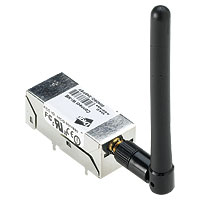
What do you do when you need to embed WiFi into a project really quick? You look for OEM modules – one of the best manufacturers being Digi. They make, amongst other variations, the Wi-ME, a small box that has a RTOS chip (it can be made to run Linux apparently) and the WiFi adapter, with a serial interface and GPIOs that go to your application. In essence, you can bridge a serial port to a TCP or UDP port and stream data to the internet, all without messy wires!

After looking at the ordering page, I duly contacted the spanish distributor Matrix. I needed two modules by this last Monday, and so I requested to have the devices shipped by Friday last week. It all turned out into one big mess, with vague excuses about not being able to ship due to warehouse problems, or that the proforma could not be generated – and so I could not pay, and they could not ship…to cut a long story short, I got the units on Tuesday.

It usually is not a problem to have a shipping delay, but in this case, I arranged a meeting with the mechanical engineers working on the project, in order for them to see the device and fit it into the 3D plastics project. They actually measure the parts, as they say working from datasheets can usually spell trouble, so ideally they would take them away after the meeting. Had Matrix simply said “we cannot send it until Monday”, I would have arranged the meeting on Wednesday – no worries. But, as it frequently happens, they wanted to look good, without having the solid ground under their feet to do so.

When a company makes a commitment, whatever it may be, it has to stick to it. And when the costumer calls, obviously pissed off at the poor performance and the mount of problems he has landed on, you have to be hellbent on fixing the situation. If the person answering the phone cannot handle the situation, he/she must be trained to transfer the call to someone who can.

What did I do? I emailed the CEO, Joseph Dunsmore. His email address is not published on Digi’s site, but if you look on the Management Team page, and scroll down a bit, Jan McBride’s email is displayed. It was a case of formatting Joseph’s name in the same manner as Jan’s email, send the diatribe, and wait. The next day, I got a reply from Joseph, telling me he would follow up the case with Digi’s Managing Director in Europe. Not three hours had passed, and I got a call from Digi’s top man in Spain, who was very supportive and understanding. By this time, I had been so smoothed over, that I really didn’t want to complain anymore! The conversation ended up very well, with Digi offering their full support on our development, and a visit arranged sometime next week.

Would I recommend Digi to anyone deciding about whether to use their products? Absolutely!


  • Seite 1
  • Seite 2
  • Nächste Seite aufrufen »

Seitenspalte

Tags

3D-Drucker Amazon AOL Apple asus memo pad Blackberry Dell DSL E-Book E-Book-Reader Ebay Elster Facebook Google Google Android Handy Hardware Hotmail IBM Internet Makerbot Microsoft mobiles Internet Netbook Prism Quantencomputer Rundfunkbeitrag Samsung samsung galaxy fame Samsung Galaxy Mega Samsung Galaxy Tab SchülerVZ Skype Smartphone Software sony xperia tablet z Suchmaschine Tablet Tintenpatronen Twitter Typo3 WebOS WhatsApp Xing Yahoo

Technik News Kategorien

Ausgewählte Artikel

LTE tilgt weiße Flecken und drückt aufs Tempo

LTE steht für Long Term Evolution und zugleich für den Vorstoß des mobilen Internets in die erste Liga der Breitband-Internetverbindungen. [...]. Heutige Angebote für mobiles Internet bringen 3,6 oder gar 7,2 MB/sec. Der Zugang erfolgt dabei meistens über einen Internet Stick der dank USB-Schnittstelle sowohl an einem Laptop wie auch am Desktop-Computer verwendet werden kann.


Externe Festplatte mit 3,5 Zoll, 2,5 Zoll oder 1,8 Zoll

Angeschlossen wird die externe Festplatte über USB, Firewire, eSATA oder einen Netzwerk-Anschluss. Vorsicht: Bei manch einer externen Festplatte stört ein lärmender Lüfter. Die kleineren Notebook-Festplatten sind 2,5-Zoll groß. Eine externe Festplatte mit 2,5-Zoll nimmt in den meisten Fällen über den USB-Anschluss Kontakt zum Computer auf und wird über dasselbe Kabel auch gleich mit Strom versorgt.

Inhaltsverzeichnis | Impressum und Datenschutzerklärung