Downloading music over the SGAE’s WiFi

The SGAE (Sociedad General de Autores y Editores, or General Ass. of Authors & Editors), is Spain’s equivalent of the RIAA. I was rather amused by this video, where a couple of members of a TV show attempt and succeed at connecting to the SGAE’s WiFi network (it had no encryption enabled!), and download music – alledgedly pirated. They then add an extra twist by actually walking into the SGAE’s offices and asking to see someone, laptop in hand, saying they have just had an attack of good will and want to turn themselves in…

The audio is in spanish, but you will get the general idea even if you don’t understand the talk. My oppinion is that they shouldn’t have done this, as connecting to WiFi networks without the owner’s permission is illegal in most countries, Spain included – so they have actually provided potential prosecutors a perfect piece of evidence.
The Chumby – alarm clock? GPS navigator? no – WiFi device for $150!

Yesterday I read some news about Chumby, a new WiFi device being released soon, costing $150, and which looks like an alarm clock on steroids. It features a color screen, the ability to run widgets, hackable hardware, and a squishterface (just made that up, to try to describe the squeeze sensor that the soft case uses to provide user input).

The company behind the Chumby actively promotes hacking the product in any way you want, so this could become another Roomba, albeit cooler (yes, I know, the Roomba moves, so what!). I have signed up to try and get an early sample, let’s see if they consider my arguments.

A few words of constructive criticism – when creating an account, the country drop-down list is not in alphabetical order, so you spend quite a bit of time trying to find yours (US users will have it easy, as it is the default). Additionally, once the steps are completed, you are asked to enter the device ID and give it a name, after which you end up staring at a white page with the big black words: “Application error (Rails”. Whatever that means.

Microsoft Un-Wired – making WiFi easier to use?

I read a couple of days ago about an initiative by a small team of Microsoft coders to create a tool that will make managing WiFi connectivity easier, with features such as bookmarks, network management, a hotspot locator, and interestingly, a VPN solution.

On the surface, it looks like hotspot directories JiWire or WiFi411, but the VPN is what interests me. Currently, this is an expensive add-on service offered mostly to business users to secure their traffic while on public hotspots. If Microsoft can make VPN connectivity to secure traffic for any user, it would solve many problems, and give the Wall of Sheep at DEFCON a very hard time. My only doubt about this service is if and how much it will cost.

The blog entry talks about being in beta, and thus more features being in the pipeline, so this is one I’ll be watching with interest.

Macs DO crash, and aren’t that good at maths

Today I am really peeved with my MacBook Pro. This is the second time I start this post, thanks to the almighty never-ever-hangs-honestly OS X. I intended to write a short diatribe about how remaining time for various things is not calculated right.

Let’s get the first part over with. Just before the crash, I woke up the Mac from suspended animation, and surprisingly, the battery monitor reported 158:34 hours of battery life remaining…whoa! Lets assume the average battery life of 3 hours corresponds to a battery capacity of 4Ah (Ampere-hours) – then my Mac carries a 118Ah battery. For reference, your run-of-the-mill car battery has around 70Ah. Go figure.

The second time miss-calculation happened when I extracted an archive with StuffIt, which told me I had over 300 hours to wait…when the file size was only 2MB. I will try to take screenshots next time. It is obvious that these are dumb figures, but one has to wonder why there isn’t a top limit on the values, mainly so that it doesn’t look ridiculous.

Now, for the fuming rant. I am heading back home on the bus, and to kill time, I decided to write this post. To connect to the internet while on the move, I use a Nokia N70 over Bluetooth, which gives me 3G speed (you at the back, stop giggling!). Suddenly, and before I had time to click ‘Save and Continue Editing’ for the first time, the connection froze. I tried to disconnect, and Internet Connect remained stuck on “Disconnecting…”. There was no way to get it to actually finish the disconnection process…then I noticed the N70 was actually frozen too! Cursing my luck, I removed the battery from the phone, switched Bluetooth off on the Mac, tried to kill Internet Connect using the terminal…nothing. Whether the Mac froze the N70 or the other way around is unknown, but it is clear that both have a serious flaw for this to happen.

Shutdown time. I copy-pasted the text I had written into TextEdit, and saved it to the desktop. Then, without closing TextEdit, I tried to restart the Mac, but it was having none of it. As a last attempt, I held the power button down for five seconds, and finally, it shut down. The surprise came after restarting – the text file was gone from the desktop, and with it my half-written post. There was no trace of it anywhere, neither in Finder’s nor in TextEdit’s recent file list…Is this a serious problem?

I admit that so far, the Mac has proven very stable, with very few problems, and minor ones at that. But if it is possible to have incidents like the one I experienced, then the message about how Macs are un-crashable is simply not true. I know that Robert Scoble had a similar problem with a machine just like mine, his post relating to Dave Winer’s crash report. In my case, the damage wasn’t that great, but imagine this happening towards the end of a long process, like encoding a long video edit. Mac accolites will surely say “But Windows crashes too!”. I’d answer “But Microsoft doesn’t go around publishing agressive campaigns saying how Windows PCs are rock-solid in comparison with the monkey-on-acid-squeek-of-death”.

I love my Mac. But I disagree with the hype.

The clueless pitcher’s guide to TechCrunch parties, and mini-review of TechCrunch 7

Friday night I attended Michael Arrington’s TechCrunch 7 party, held at August Capital in Menlo Park, where VCs, startups, and where everyone who is anyone was supposed to be. I saw Robert Scoble, Shel Israel, Guy Kawasaki and his permasmile, Michael of course, and a bunch of other people. I also managed to get in touch with those who I had in mind, so all went well.

What I found curious was the large amount of atendees who were wondering around with a clueless face, obviously looking for a VC or famous person to pitch their startup. I talked to a guy that wants people to anonymously share their wage, so that others in the same industry can check whether they are being overpaid (yeah, right!), or driven as slaves. The revenue model? deep breath…ready?……advertising! The startup I’m involved with right now has ads right at the bottom of the food chain, as something nice to have. Here are a few tips for you guys, when you attend the next TechCrunch party:

  • Plan who you want to talk to beforehand, and go directly to get them. Arrive early, well before the start time, so you can at least catch Michael, if he is on your list, before he starts getting nervous from all the attention. You will find it quite hard to get him to listen to you at 11:30, with the amount of people he always has around. However, if the person you want to talk to is not such an attention-getter, but likes his spirits (in an alcoholic sense), maybe he will sign you a nice blank check, so it may be worth a longer wait.
  • Mount guard in front of the restroom. Everyone is bound to go there at some stage during the party, specially as the flow of beverages increases. Most people won’t follow Scoble to take a pee with him while they discuss the next video blogging development – but you are desperate, so go for it!
  • Have a great conversation startup line ready – going up to someone and babbling something about how much you follow their blog or what great things they have done will usually get you a yes-I-know-you-do-like-all-the-other-hundreds-of-thousands-like-you smile, a handshake if you are lucky, and a chance to take your photo with them, but that is it. For example, if you wanted to talk to Guy Kawasaki, you could say “hey Guy, I am looking for advice, so I will ask you for money” (Hint: read his book). Guy, if you read this, let me know if it would have worked – it was the best I could think of.
  • Wear a tee that says something about your startup. A colleague of mine wore one that always got the “what is xyz about?” question. Don’t overdoit, so you look like an walking ad, and don’t put your 10 PowerPoint pitch slides on the front and back. A simple, intriguing, eye-catching message will do. As a practical example, take a look at how many pics of that girl with the “hate your job?” tee are on Flickr.
  • Take your laptop, making sure the battery is fully charged, and also take a printed copy of your product presentation or pitch. Have it printed on quality paper and nicely bound – it can cost you $50, but will you regret it if it helps bring in $5 million? Don’t take them with you to the party, nothing looks worse than someone walking around with a PowerPoint presentation under his arm – leave them in the car, you can always quickly dash out to get them if someone gets so interested in you that they want to have a more official presentation on the spot.
  • Be prepared to take criticism, as you will meet people who are completely oblivious to what you are doing, and may just have some fun taking a big poke at your ideas. This is something that actually happened to me with a guy from this company that starts with Y and ends with hoo!.
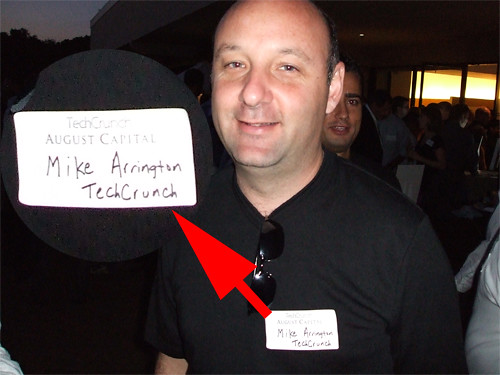
  • Make yourself a decent badge – don’t just write “Mike” on it, write your name, surname, and the company you represent. I noticed almost everyone that crossed your path looked at your badge, so make it clear and easy to read.

As a whole, the party was quite good. It even had a streaker, who most likely earned only $100, as a proper streaker would have been completely naked (and maybe with a pitch written on his back). There was plenty to eat and drink, and many interesting people to talk with. Some random thoughts:

  • One comment to the Pandora guys: next time, invest some money on a decent audio system, the two tiny speakers and cheap microphone just didn’t cut it. Also, place a couple of speakers at the far corners from the stand, otherwise the people at the end don’t even realise someone is giving a speech. The Pandora service itself rocks!
  • It was surprising that when we arrived, the registration desk hadn’t received the Wiki list, thus entry was denied to non-sponsors for a while. The situation was quickly resolved, and all turned out well.
  • The icecream sandwitches were awsome, please have them around at the next party!
  • The lights could have been switched on early, there was a time when it became hard to read other people’s badges.
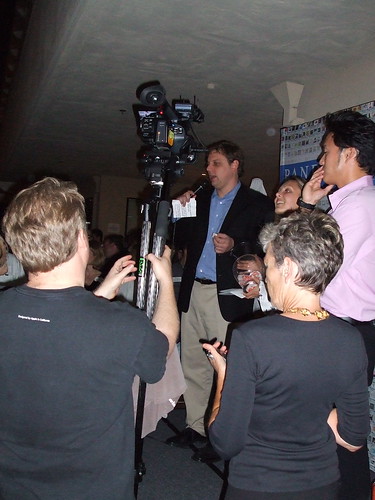
  • It was curious to watch Robert Scoble handle his high-def camera while recording Michael’s speech – he went through like a dozen menus to configure the low-light settings. Whether he had to go through so many options was because they were really needed and he completely masters the menus, or it was him being still a bit new to the camera is unknown. Here is a pic of him handling the thing:

Scoble and his camera

  • The Soonr demo was excellent, albeit Song was very excited and looked a tad over-revved. Thanks for the tee! I will be certainly be using your service, the Skype relay looks very promising.
  • The Plazes CEO was very dry when we asked him to confirm rumours about their relationship with FON (other than Martin Varsavsky investing in them), and as to them handling the geocoding of FON’s hotspots. There has been a deluge of criticisms towards FON’s Google maps, and the inaccuracy of the positioning of the hotspots, so maybe this was the reason he was uncomfortable.
  • I have a theory – Michael Arrington envisioned the riot of people trying to talk to him, and thus placed some convenient doubles around the crowd. This picture is an example:

Fake Mike Arrington

  • The venue was great, plenty of space, plenty of seating, and the weather turned out great – thanks go to Augusta Capital for providing the space, and to Michael for hosting the event.
  • Guy Kawasaki seemed to come to take pictures of everything, at least, that’s all I saw him do – when I wanted to find him later on for a quick talk, he was nowhere to be seen.
  • I can recommend the Menlo Park Inn if you want accomodation in a well-communicated place (at least by car), and particularly, with free WiFi. The rooms were spacious and tidy, and the breakfast simple but sufficient, and included in the room price.

In all, I had a really good time, got things done, and so I am looking forward to the next one!

My Boeing 767 runs Linux, and yours?

This was seen on a Boeing 767 while en route from Las Vegas to Atlanta, the flight being operated by Delta. Apparently, many people were having problems with their purchased movies, and so the crew decided to reset the system, provoking a nicely familiar sight.

215975831_a92b862a26

Linux on a plane

Now we could all start making jokes about nmapping the plane, or trying to run Asterisk off a USB drive plugged into the management console, which by the way was accessible to anyone who wandered to the toilet and happened to look left. It had a nice big “Reset all” button too, two USB ports, and a gigabit etherenet RJ45. I just hope they don’t run a kernel with some remote_crash_plane() buffer overflow exploit…

DEFCON 14 – A hacker’s paradise

I have just returned from a vacation, interluded by a couple of trips – one of them to DEFCON, the world’s largest hacker conference. This year, it ran at the Riviera hotel and casino in Las Vegas at the beginning of august.

There was plenty to see and do, from conferences as interesting as war-rocketing to an insight into the US-VISIT program, and it’s plans to implement RFID tags into the green visa waivers, or the 2D barcode receipts given out at airports.

I participated in the wardriving events, organised by Thorn, and which consisted of the Running Man and Fox Hunt competitions. Our team was led by Renderman, and we had some backup that put up some noise (fake APs, floods, etc.) to make the contest more interesting.

The Running Man started well, but unfortunately the other team tripped casino security by walking past their booth with a magmount omni antenna on each shoulder, a laptop, several WiFi cards dangling from their belts, a YellowJacket, and other gear – apparently, the IT guys freaked out, and they wanted the contest shut down. After the intervention of Ross and Priest, we were allowed to carry on, but limiting the search area to the venue, and not the whole casino. After the contest resumed, we found the Running Man in around 15 minutes, and won!

The second contest, Fox Hunt, consisted of a hidden WRT54G that was only on for 15 seconds every minute. One was supposed to locate the fox, connect to it, and change the SSID after brute-forcing admin account. 15 seconds to do all that is not a lot! So, our plan was to locate the fox….and make a run with it to a safe place, so we could kill the 15 second timer circuit, reduce the amount of RF leaking out and have a go at changing the SSID. The first part of the plan went well, but then the other team got slightly miffed, called Thorn, who in turn called us to go back to the contest table with the WRT so the other team could also have a go at it.

Interestingly, Thorn had taped the admin password to the bottom of the router, but neither team noticed it! In fact, the other team ended up brute-forcing the AP and changing the SSID. We contested that since when we removed and reapplied power to the AP, the SSID went back to its default, we had in fact won, but Thorn wasn’t having any of it. The contest was a tie, which was decided by the question “Who owns the OID 00:00:00?”, the answer to which is Xerox. We got it wrong, and so we lost. Next year we will be better prepared for sure.

Here are a few pictures from the event:

215968623_41bb4d0a52

Thorn and Renderman giving their presentation on the Church of Wifi, with CoWPatty, the WPA rainbow table generator, and the WRT54G mods, which included my WaRThog.

215972088_93d246f6a7

The war-rocketing guys, and their awsome rocket. I wonder how they got that thing past airport security.

219943777_5f1822fcfd

The WaRThog on the left, with two more of CoWF’s modified WRT54Gs.

219943269_35eee99859

If you used DEFCON’s wireless network to check your email, access your corporate network, etc., but didn’t use any form of security (VPN, SSH…), you are bound to be in the Wall of Sheep. It displays captured user names, passwords, domains and access methods – I actually had the two colleagues travelling with me show up here, even though I told them to not even open their laptops while at the con.

See you next year!