It will not surprise some people, but after the online newspaper El Mundo, the most read online news source in Spain, ran a poll to rank the best and worst companies of 2006, FON came as the winner in the ‘worst’ category (scroll down a bit, about half way down). With comments such as ‘a project with no future’ and ‘hot air’, readers gave enough bad marks to put FON in the spot. The poll was open, so people could vote for any company they wanted, there was no shortlist or closed options.
I have been very critic with FON in the past, and I have also been accused of all sorts of things in relation to the criticism, but I know there are a lot of people out there upset with the way things have been running. They have had many chances to fix their problems, it’s not that hard to implement a decent customer service, or to fulfill orders in reasonable time, it just takes good management and a competent team. I am sure there are many very competent people at FON, who work really hard every day to make things happen, but their efforts have sadly not transpired.
As for the picture, I hope it doesn’t offend anyone, but since there was no response by Martin to my comments on his blog after his acid post, or after reporting the vulnerability in their maps service, I don’t have any moral issue about making fun of FON (no pun intended…well…sort of).
Archiv für 2006
Trying to hire hackers to commit a crime is a bad idea
This is rather funny, be it not because it involves a US congressman, Denny Rehberg of Montana, and his communications director. Apparently, Rehberg was not happy with the grades he got while at Texas Christian University, and thus started to shop around for a hacker that would break into the institution’s systems to upgrade his grades. He contacted none other than attrition.org, where the entire email exchange has been posted. It is a rather fun read if you are a true hacker – not to be confused with a criminal, who are into doing these sort of things – and a warning to clueless politicians.
The Fonera, hacked to run OpenWRT
It was only a matter of time until the developers of open-source firmware OpenWRT and DD-WRT managed to port the OS to the Fonera, which is based on an Atheros chipset. As described in this thread of the DD-WRT forums, there is a firmware package available for download, which can be flashed onto the Fonera, thus replacing FON’s original firmware and functionality. I think it will be a matter of time until we see reflashed Foneras on eBay, just like we saw Linksys once upon a time.
The hack is not for the faint-hearted, and so you risk bricking your router if the flashing fails – there is still a way to de-brick using the serial port, but in any case, don’t try this at home unless you know what you are doing. We are on the cutting edge of the development, which eventually trickles down into easier-to-follow HOWTOs and step-by-step guides.
Verizon to kill the mobile internet
Not much point to .mobi domains in the realms of Verizon, it seems – the New York Times reports that starting 2007, ads will be placed on sites that are accessed using their mobile phones. The Verizon Wireless release claims that certain types of ads and video clips will not be allowed, as they may not be compatible with the limited browsers found in the phones, but this is not very encouraging – meaning that they will allow video clips. Will this not hugely increase the amount of data used during browsing? I believe Verizon offers all-you-can-eat data plans, but if you are not using one of those, you could feel the pain. In any case, having to wade through a mobile website rendered on a tiny screen is hard enough as it is, with some devices not being able to cope with the amount of processing required, resulting in a very slow and frustrating experience. Add videos, which require much higher resources to be played back, and you have a recipe for disaster.
Steve Uhrig, in memoriam
A few weeks ago, I learned about the passing of a good friend, Steve Uhrig. A few years ago, I was involved in projects relating to IT security, surveillance, tracking and communications, and in this line of work I met Steve. When I joined a TSCM mailing list, actually, the TSCM mailing list, one of the members that caught my attention was him – always outspoken, honest and technically sound. He would not take crap from anybody, and provided lengthy explanations or rebuttals in his posts. He was always there to lend a hand.
Steve ran SWS Security, and specialized in everything related to surveillance and communications, working with many government agencies over the years, and even becoming the technical advisor in the movie ‘Enemy of the State‘, where he also got a small part as the guy selling electronics in a shop. You can read more about him and his activities in his own website, still maintained by his friend M.L. Shannon. He was also involved in the amateur radio community, his callsign WA3SWS now silent, also actively participating in emergency communications support.
Whenever I got stuck in a particular subject, Steve would always gladly help, spending hours answering to emails about technical subjects in great depth, be it grounding systems for lightning protection to high-performance surveillance camera systems. I will miss him a lot, and only wish I could have had more time to get to know him better. This time of the year is when one tends to remember parted friends and family, so this is my little tribute to his memory.
How not to install a WiFi antenna
Leaving aside regulatory issues that may turn this particular setup into an illegal operation, I will better not describe the quality of the installation to be polite. Check out this picture:
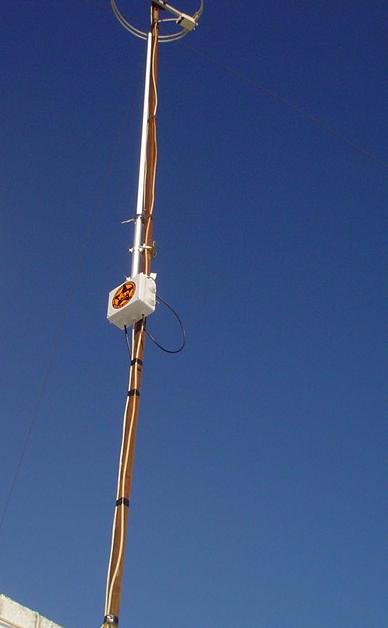
Spotted the problem yet? Radio antennas are affected by any element that is present around them, even non-metallic elements, such as the ground. In this particular case, kanijo, a Fonero, has attempted to provide more “range” to his FON hotspot, which is in itself commendable, however, the means may not result in the desired end.
You can see that the vertical omni antenna, a carefully tuned radiating element, has been strapped to a metallic pole, which also runs a coaxial cable into a TV antenna right on top. The router is inside a sealed plastic box, with power and Ethernet going into it from below. There is no way that this antenna is radiating correctly, as the pole that supports it is probably grounded (if it has been installed according to regulations), and even if it is not, it is inducing an imbalance into the tuned element, causing a large amount of RF to be attenuated. The user reports good results with it, which are most likely due to good luck.
The second problem with this type of setup is that vertical antennas don’t emit downwards, and thus will provide very limited coverage to users below the antenna. There is some downwards bleed of course, but it will only reach lower users that are some distance away from the antenna.
Recommendations for these sort of setups: install the antenna right at the top of its own pole, and ground the pole. If you have no choice but to use an existing pole, get a T arm fitting and mount the antenna at least 1 meter (3 feet) away from the pole. A perfect example of such as setup, in this case with two supports as the antenna is rather large and care for wind load is needed, is this (credit to Roger Halstead):

Check out Roger’s page, it is a very good read if you are interested in radio installations.